
7 methods to measure your web site's UX
User experience (UX) is an essential element of website design and administration, and it may have a bigger impact than you think.
What happens when someone first lands on your website? Does it load quickly? Can you say you are in the right place? Is it easy to figure out what to do next?
UX refers to the human experience of using your website. What might make you wonder how you measure UX?
Why it is important to measure UX
Website users are potential customers. Your ability to navigate your website becomes their experience and impression of your business.
What do you think happens if a customer visits your website and can't find an answer to their question? What if they can't figure out how to check out from your online store?
If a user is having trouble using your website, they may decide it isn't worth the effort. On the other hand, creating a seamless experience is likely to lead to successful conversions and repeat visits.
What do you think will lead to higher revenues?
Now you understand why it is important to understand how users are using your website and fix what is causing their frustration. But how do you measure it?
Measure UX with these helpful metrics
Reduce the guesswork by tracking and analyzing certain metrics to understand exactly what happens when users land on your website (and why they leave).
There are two main types of UX metrics: objective and qualitative.
Objective metrics are items that have been assigned precise numbers for tracking and comparison, such as: B. working hours, success rate or user error. On the other hand, subjective metrics can provide information about how a user assesses the experience of using your website. They can include usability or satisfaction ratings.
Qualitative metrics measure the quality of the customer experience on your website and include recommendations, satisfaction and ratings. Behavioral metrics express in numbers how users interact with your website during their visit.
Google created the HEART framework, which offers a mix of objective and qualitative metrics to get a complete picture of UX. The framework serves as a guide for deciding which metrics might be important to you. It measures happiness, engagement, adoption, retention, and task success.
It's important to note that measuring UX can tell you what people are doing on your website. However, you cannot tell why or you can address challenges head on. They won't be collecting names of customers to contact as you would if there was a customer service issue.
Instead, this is a general view of what's going on on your website that you can use to try different features or solutions, and A / B testing to see if the results are positive.
The following list provides several ways that UX designers can measure UX as they create and update websites for the best user experience and satisfaction.
1. User interaction with forms
Website forms are a common way for customers to contact you, sign up for information or specials, and request offers or specifications for a particular product.
You feel like an easy win because customer data is valuable, but many users shy away from forms that ask for too much information or are difficult to fill out.
An easy way to find out what customers think of your website forms is to use a tool like Hotjar to find the information they need, such as: B. Which information fields should not be filled out by some users.
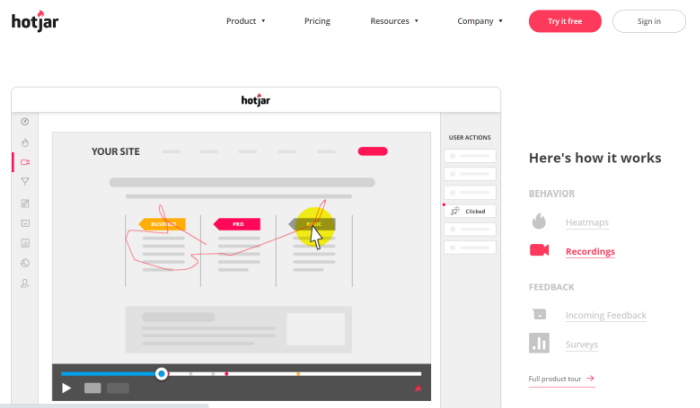
Hotjar's forms feature also allows you to provide video recordings to show how users interact with your forms on your website.
While the users may be anonymous, the information can be critical to making changes to your online forms. You will see where they seem hesitant and which fields they skip. If users don't fill out the form and don't submit their information, you will have lost all data. So only ask for the minimum amount of information you need.
Remember to make it easier to fill out the mobile version of your form as users use a touch screen instead of a keyboard.
2. How users navigate your website
Wouldn't it be great to know what your website visitors are doing and click when they visit your website?
If you want to measure UX, this is a valuable finding. Heatmaps can tell you where people are clicking on your website and give you a glimpse of how your layout and design could help or harm you. Crazy Egg is a tool that offers this service.
Mine this information for positive and negative feedback. You may find that certain layout colors grab attention while your users ignore others. The positioning of features can affect engagement, as can the call to action.
Suppose you notice that your users click certain buttons on your website but ignore others. You can make adjustments to add more functionality and customize areas that they seem to ignore.
You can also use this knowledge as you design or edit other pages on your website, repeating features that your users seem to like.
When you track and measure where people click, you'll get insights. Options like Confetti, one of Crazy Egg's features, can show you where the user's clicks are coming from.
Did they come from another page on your website? Was it from an ad on social media aimed at driving clicks on a product page? These tools will help you find out.
3. Usability tests to measure UX
You don't need an expert to test the usability of the website. In some cases, it can be more valuable to get feedback from people who are not on your team. Reach out to some trusted people (friends, family, some customers) to test the usability of your website.
Ask them to browse the website, fill out forms, and make a purchase if they can. You should aim to do whatever a new user of your website might try.
What works? What not? What steps are you unable to complete or are they time consuming? These are all important areas that you need to explore to see what you can do to smoothen the experience.
Depending on what you want users to do on your website, you might be looking for feedback on whether they found the website to be easy to use and how quickly they can complete certain tasks.
Ask if there are areas where they no longer need to go through the site, such as: E.g. a form that was not properly submitted or a purchase that was not properly made.
4. Track page views and time on the page
When users are ready to spend time on your website, it is a promising sign that your website is easy to navigate. You are probably comfortable and enjoying the experience and can visit multiple sites.
When you start measuring UX, you may wonder how long an ideal website session can be. The answer depends on your website and what you want people to do when they visit.
Typically, you want users to be on each page long enough to get the information they need and take the next step toward conversion. Successful progress could be finding the call-to-action buttons that take you to the next page or signing up for an email newsletter.
However, very long results on the page may indicate a problem. Pay attention to other indicators, such as For example, users might think about leaving your website after viewing a particular page for a long time or not filling out a form. The page itself might be confusing or inconsistent with the call to action you selected.
5. Conduct a customer success survey Measure UX
A customer success survey measures how satisfied visitors are with your website. It's a great place to measure UX.
Ask about customer satisfaction, their willingness to recommend your product or service to others, and whether they achieved their goals on your website during their visit. Did you find what you were looking for?
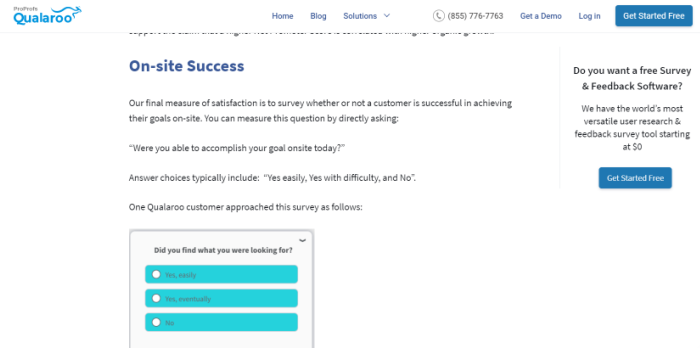
Use a tool like Qualaroo to collect responses from your customers and then use the information to make changes to your website. Your goal will always be to make the experience as seamless as possible. Therefore, it is worth removing obstacles.
6. Rely on your customer service team
Who do your customers turn to if they can't find what they need on your website? Your customer service team.
Your service team is a likely source of repeated questions and complaints about difficulty using the website.
Some of these could be problems that you can fix or information gaps that you can fill. Your customers may also be unhappy with any updates you made to the website. A fancy new feature is only as valuable as its users can use it successfully.
Look for common issues and track customer complaints. Then use this data to find and fix UX issues.
7. Track the page loading speed Measure UX
If you want users to stick with you and see what you have to offer, your website should load quickly. Page load speed is a crucial element that affects search engine rankings and UX.
According to Unbounce, nearly 70 percent of consumers say page speed affects their desire to shop at an online retailer. And over 36 percent say slow loading times make them less likely to come back to an ecommerce website the next time. These lost users can cause significant losses to your bottom line.
What are the factors slowing down your page loading? Large image and video files can often be the culprits. Here are some ways to make the page load longer.
You can use Google's PageSpeed Insights to check how fast your website is loading. It can help you identify which pages are causing problems and which are causing the delay. With a little effort, you can get 100 percent on Google PageSpeed Insights.
If your page is loading too slowly, you should revise the images or compress your video files. You can use tools like Optimizilla or TinyPNG that work on all platforms.
Conclusion
Once you've created your first website, you may think that you've done most of the work. However, maintaining a website that works for your users takes continuous effort.
A useful website must help grow your business. This means that you always need to measure UX and see how effectively your website is doing its job.
The design, layout, images and copy are of course important. However, functionality is just as important. If you want visitors to convert, you need to find and fix barriers to conversion.
There are always ways to tweak the ongoing challenge of keeping your UX at optimal levels. Digital advice can help you measure your UX and most importantly, actually use the data and feedback you have collected.
Have you used any of the methods above to measure UX on your website? What were your results?

See How my agency can drive Firmly Traffic volumes on your website
- SEO – Unlock tons of SEO traffic. See real results.
- Content Marketing – Our team creates epic content that is shared, links accessed and visitors drawn.
- Paid media – effective paid strategies with a clear ROI.
Book a call