
How Pinterest Story Pins can enhance your advertising and marketing
Instagram, Facebook, and Snapchat usually dominate the social media marketing discussion. Pinterest seems tired of being underestimated.
They recently introduced a new feature that offers the opportunity to change the world of Pinterest marketing. So what is it and what do you need to know about the latest Pinterest feature?
Whether you are a seasoned Pinterest veteran or new to the social media platform, Pinterest Story Pins are an exciting opportunity to engage with your audience and gain more brand awareness.
Story Pins can help you add value to your followers, stimulate action, and, more importantly, drive traffic to your website.
This new feature will soon be commonplace on the platform. Here are a few tips to help you get the most out of Pinterest Story Pins.
What are Pinterest Story Pins?
Story Pins are the latest feature on Pinterest that allows brands to create the “inspirational” content your followers want. In contrast to a normal Pin, which is just an image or video with a description and a link, Story Pins allow you to include multiple pages with images, videos, text and links.
Pinterest Story Pins consist of five to 20 slides and are an opportunity for you to tell a story and engage your audience in much greater depth. Unlike Instagram and Facebook stories, they don't expire after a set amount of time.
Story Pins also allow users to post unique content directly to Pinterest instead of just distributing content posted elsewhere.
This provides the perfect platform to showcase content that is longer and more in-depth than your regular Pins, and leads people to your website's content.
Here is an example of a story pin for a baggage check:

They can also be used for travel guides, like this one from the Edinburgh Insider Guide:
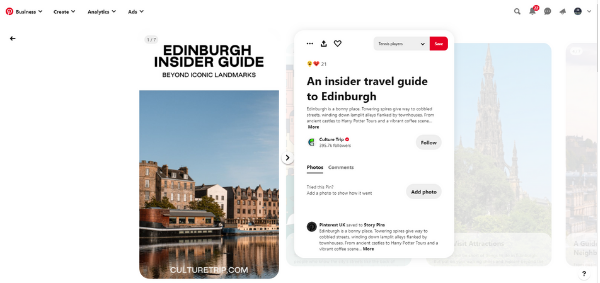
For companies, story pins offer an excellent opportunity to present specialist knowledge and engage people with valuable content.
With the ability to include more multimedia, more text, and more links, you can grab people's attention, motivate them, and then get them to click on your website.
Who can use Pinterest Story Pins?
The Pinterest Story Pins are gradually being rolled out so that they are not yet available in all countries.
Many developers in the US have been invited to look into the story pin function early on. However, if you don't already have access, you can submit a request on the Pinterest website.
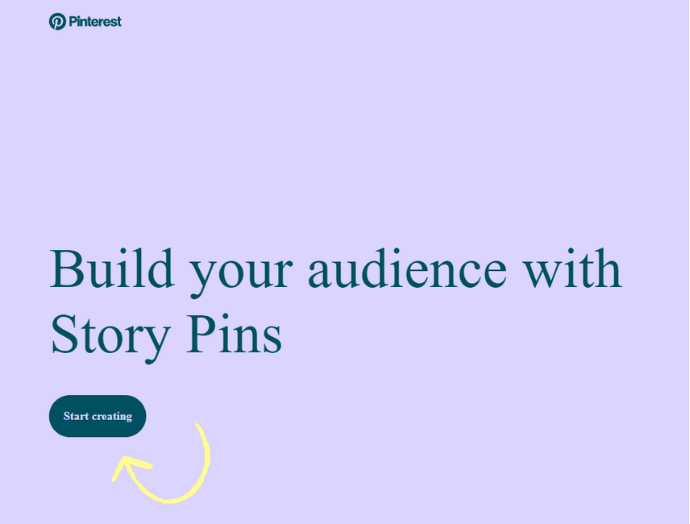
Filling out the request takes a few seconds. You will find out if you can get access to Pinterest Story Pins within five to seven business days.
With early access, you can take a look at this exciting new feature and understand how it can work for your business before everyone else realizes the benefits. So it's worth the effort.
Once you've got access to Story Pins on Pinterest, it's time to get your creative juices flowing and see all the great content to put in across 20 pages!
Here's how to prepare your business for the adoption of Pinterest Story Pins
While waiting to receive a response from your request to unlock the Story Pins feature, there are a number of things you can do to get ready. Story Pins may be a new feature on Pinterest, but ultimately it's still Pinterest, so you have a good idea of what works and what doesn't.
Before jumping headlong into Story Pins for Pinterest, make sure you have a clear plan for how you are going to use them. Here's how to get started.
Understand your audience
You can reach a large audience with Pinterest. However, this only makes sense if you reach the right people with the right message. If you want to involve the right people, you need to understand what your audience looks like and what type of content they want.
If you have an established business, you already have access to extensive audience data. So make the most of your analysis. Use your Pinterest analytics, other social analytics, and your website data to better understand your target audience and the content they are looking for.
Before you begin your Pinterest Story Pins, make sure you can answer these six questions about your audience:
- Who are you?
- What are your greatest difficulties / problems / wishes?
- Where can you find the information you need?
- What are the benefits of your product for them?
- What is negatively attracting their attention?
- Who do you trust?
Prepare your multimedia content
Pinterest actively promotes new content with story pins. So give them what they are looking for by providing all of your pictures and videos. Poor quality multimedia doesn't work well on Pinterest (or any other social platform). So invest in high quality photos and videos.
Think about your audience as you take your pictures and videos and give them something that inspires them to take action.
You now have so much freedom that you can use up to 20 slides. So use your creativity to highlight your new Story Pins.
Use Pinterest Analytics
Pinterest has expanded its analysis over the past few years, and you can find extremely helpful insights here. Story Pins may be a new feature, but the things that made your old Pins successful in the past still work today.
Use Pinterest Analytics to find out which Pins have worked for you in the past.
To view Analytics, sign in to your Pinterest Business account and click Analytics.
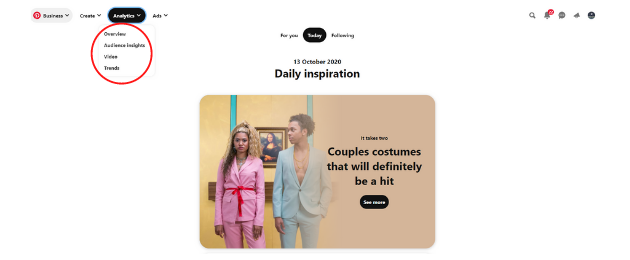
From there, you can see which Pins are getting the most views and engagements.
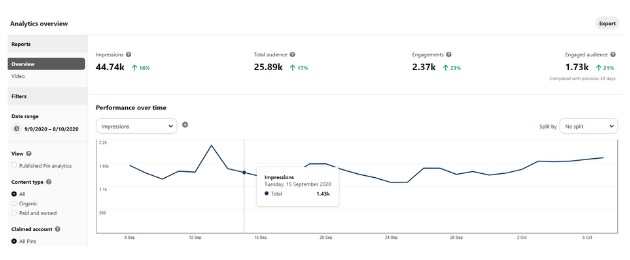
Once you see which Pins are the most popular, think about how to successfully convert them into Story Pins. For example, can you turn a DIY post into a story pin with detailed instructions?
This is a great way to grow some of your favorite content and reach a wider audience.
It might be your first time using Pinterest Story Pins, but you can make sure you're on the right track by using content that is already working well.
Why should your business use Pinterest Story Pins?
Pinterest Story Pins are still in their infancy, which means there isn't a lot of data available right now.
However, similar features have been a huge hit on other social media platforms like Facebook and Instagram with millions of active daily users. Pinterest went to great lengths to create its own version.
This suggests that Pinterest will be pushing the story feature (like Instagram) and making sure that story pins get a lot of exposure.
Aside from the fact that Pinterest is invested in Story Pins – they've been testing them in different markets for over a year – these new Pins seem to have many business benefits.
Regular pins don't give you much time to earn a click – your picture, video, or short text has to do all the hard work for you. However, you have so much to do with a story pin to keep your audience engaged.
You can also include multiple links, which gives you a much better chance of drawing your audience to your website. From here you control the customer journey and are in an excellent position to achieve your goals.
Long story short, you want to get clicks on your website and to do that you need to engage your followers with valuable content. Story Pins are a great opportunity to do this.
When should you use Pinterest Story Pins?
Regular Pinterest Pins are great for traditional Pinterest content like recipes and DIY tips. However, Story Pins are a great resource for how-to guides to do in any niche.
For example, a story about “Creating the Perfect Pinterest Story Pins” is ideal. Videos and text show the steps to create engaging Story Pins.
This is an excellent opportunity to revise some of your blog posts and turn them into easy-to-consume social posts. If you have guides, recipes, list posts, longer DIY guides, travel tips, or even detailed reviews, then you've got what it takes to be a great Pinterest Story Pin.
You'll still want to create regular Pins with short, snappy, and actionable messages, but you'll use Story Pins to get more detailed information.
Story Pins are like a bridge between your regular Pins and your full content. This is a great way to drive your audience to your website to consume more content.
How to create a Pinterest Story Pin
You're all ready for Pinterest Story Pins, you've narrowed your audience, prepared your creatives, and just got access. So how do you create your first Story Pin?
You can use your Pinterest business account to create Story Pins on desktop or mobile.
Create Pinterest Story Pins on the desktop
- Click the Create button in the top left and choose Create Story Pin.
- Add up to 20 pictures or videos.
- Design your pages. You can change the layout, add text overlays, adjust / resize your image and add more pages.
- Add extra text to inspire your audience.
- Select your story pin title, select the board you want to pin to, and add tags so people can find your pin.
- Click Publish.
Create Pinterest Story Pins on mobile devices
- Click the + button at the bottom of the screen and select Story Pin.
- Decide what your pin is about. Choose between "Recipe", "Craft + DIY" or "something else".
- Select your photos and videos from your library.
- Get creative with your design by choosing your cover photo, resizing the images, and adding a text overlay to bring your Story Pin to life.
- Add the finishing touches by creating a title for your Story Pin, choosing the board to pin, adding extra details, and tagging your Story Pin to be discoverable.
- Click Publish.
What Makes a Successful Pinterest Story Pin?
A successful Pinterest Story Pin is all about engagement. Pinterest Stories allow you to keep people's attention longer and more time to inspire them to take the action that should be taken.
Your Pinterest analysis gives you a lot of insight into the performance of your Story Pins, but also your website. You want your Pins to perform well on Pinterest and get lots of impressions and link clicks. However, we can keep track of this and see how people interact with our website when they come from Pinterest.
If you are creating amazing Story Pins that will inspire people with your message, it should get people clicking on your website and spending a lot of time on the content.
Track this on Google Analytics by clicking on Acquisitions, then Social Channels and Pinterest.
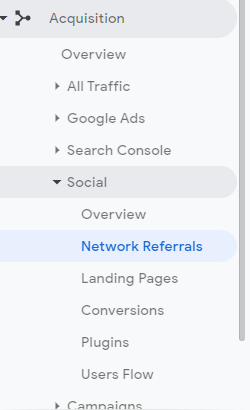
By combining your Pinterest analytics and website data, you can get a good feel for how well your new Story Pins are performing.
Tips for creating Pinterest Story Pins
The big goal of story pins is engagement, but how exactly can you achieve that? You have the ability to grab and hold people's attention, but there are several things that your Story Pins will need to do to achieve this:
- Have high quality pictures
- Attract people with catchy titles
- Meet people's expectations
- Go deeper than the average pen
- Complete the graphic with helpful text
- Radiate creativity
- Inspire action
You tell a story through your Story Pins and, like any good story, many different aspects have to come together. By combining great graphics with catchy titles, informative text, and a lot of creativity, your pins will stand out and encourage your audience to take the action they want.
Conclusion
Pinterest Story Pins are a great new feature that businesses can use to better target their audience. While the new feature is still being rolled out, you can request access and stand out from the competition.
Story Pins are another way to get people's attention and get them excited about your content. In many ways, they're even more effective at doing this than regular pins. So make sure you benefit from it.
Pinterest is the newest social media platform to bring out a story feature, and chances are that this format will stay here. Story Pins are becoming an important part of the Pinterest platform. So you can get to grips with it right now by giving your followers the amazing, detailed content they are looking for.
Have you started using Pinterest Story Pins yet?