
What are meta tags?
Let's talk about meta tags – what they are, why they matter, and how to make them better.
First things first – why did you click this article to read it?
Maybe you noticed the title, or maybe it was the short blurb that you saw.
You may just clicked because this article was from a source that you trust.
However, if you found this article through a search engine, there is a good chance that you found and clicked this article because of meta tags.
Meta tags are the foundation of SEO and the first thing you set up when creating a website.
Without meta tags, you can't reach readers organically.
Generating meta tags doesn't take long, but it's more important than you might think.
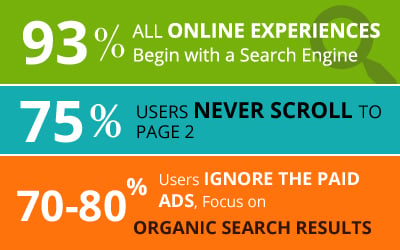
This is because 93% of all online experiences start with a search engine.
This is why so many online marketers focus on getting SEO right.
Organic search traffic is the holy grail of SEO, so it cannot be ignored.
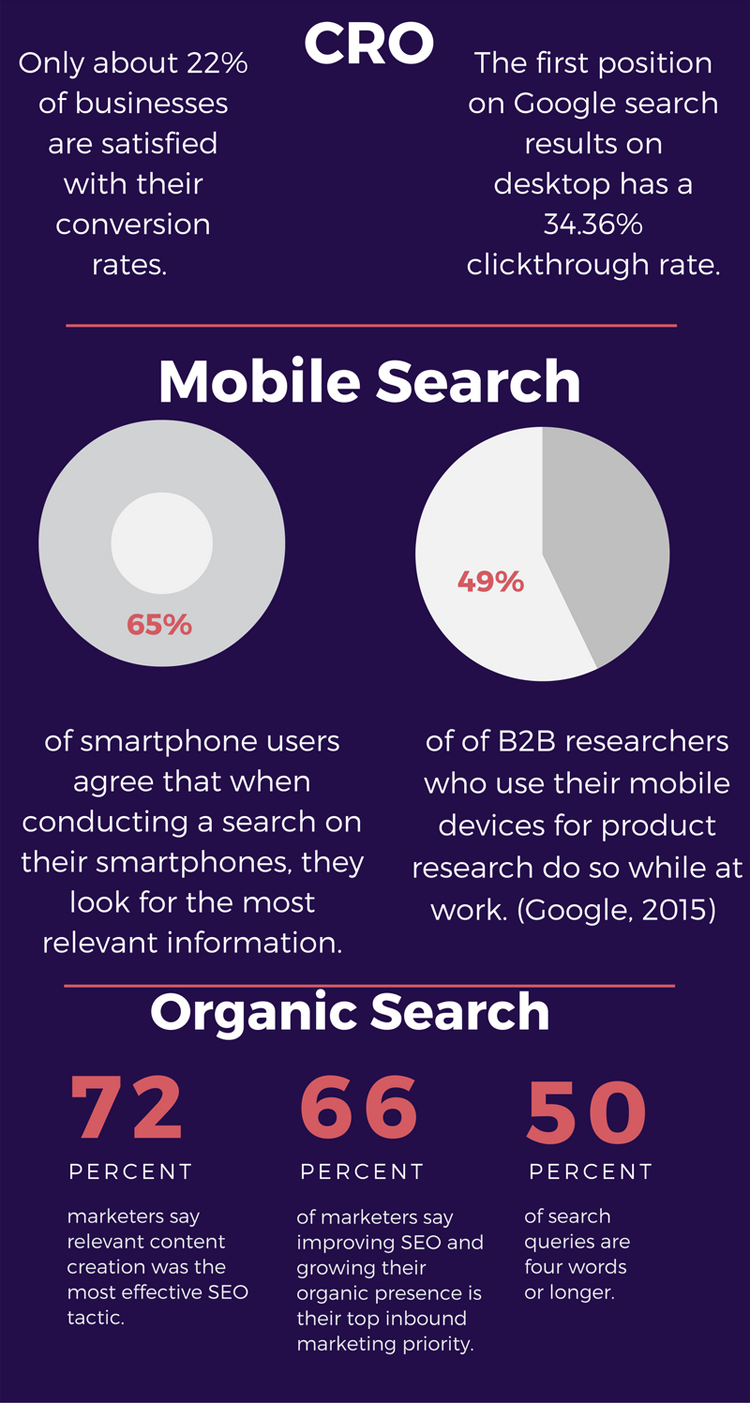
Your content needs to be readable and engaging to search engine users.
Very specific syntax is required.
It's similar to how bookstores and libraries organize their book archives – and that's exactly what meta tags are.
What are meta tags?
Meta tags are a type of HTML tag that provides search engines with information about a website page.
Let's take a look at the basic elements.

The title and description tags make up almost the entire entry.
Without these meta tags, you will only see my URL in Google SERPs.

Title and description tags are the two most common tags used for SEO purposes, but SEO isn't the only part of digital marketing.
Advanced digital marketing requires the use of even more tags that improve page rank and overall user experience.
Just like with this search result, you will soon find that these tags control how your entire digital presence is displayed and navigated.
Machines can read URLs perfectly. If I were to write for machines, my website would look like this:
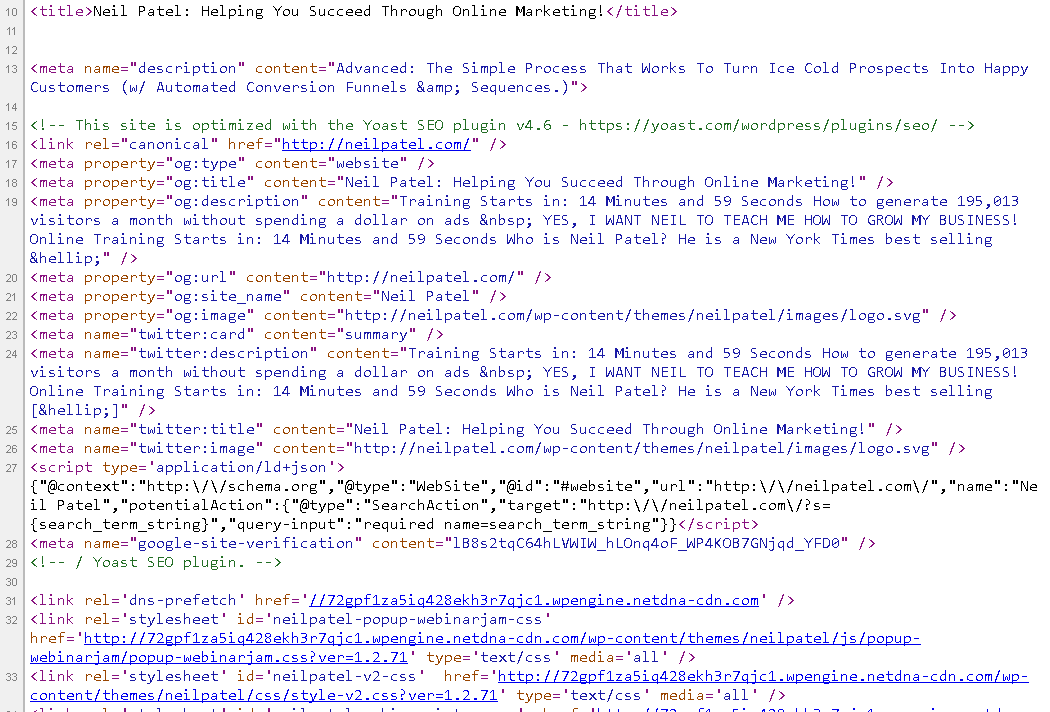
Google prioritizes certain tags because they provide context for people.
I made my website for people too, so it looks like this:

This polish is what marketing is all about.
In this blog post, we're going to examine meta tags and see how they affect all of your digital marketing efforts.
While it's simple, the devil is in the details and every detail counts.
How meta tags influence brand image and click rates
You can absolutely judge a book by its cover. This is what covers are designed for.
Your title and meta description tag form the cover for your website. You are your first impression on most visitors.
It's not just about search engines, it's also how we view the internet.
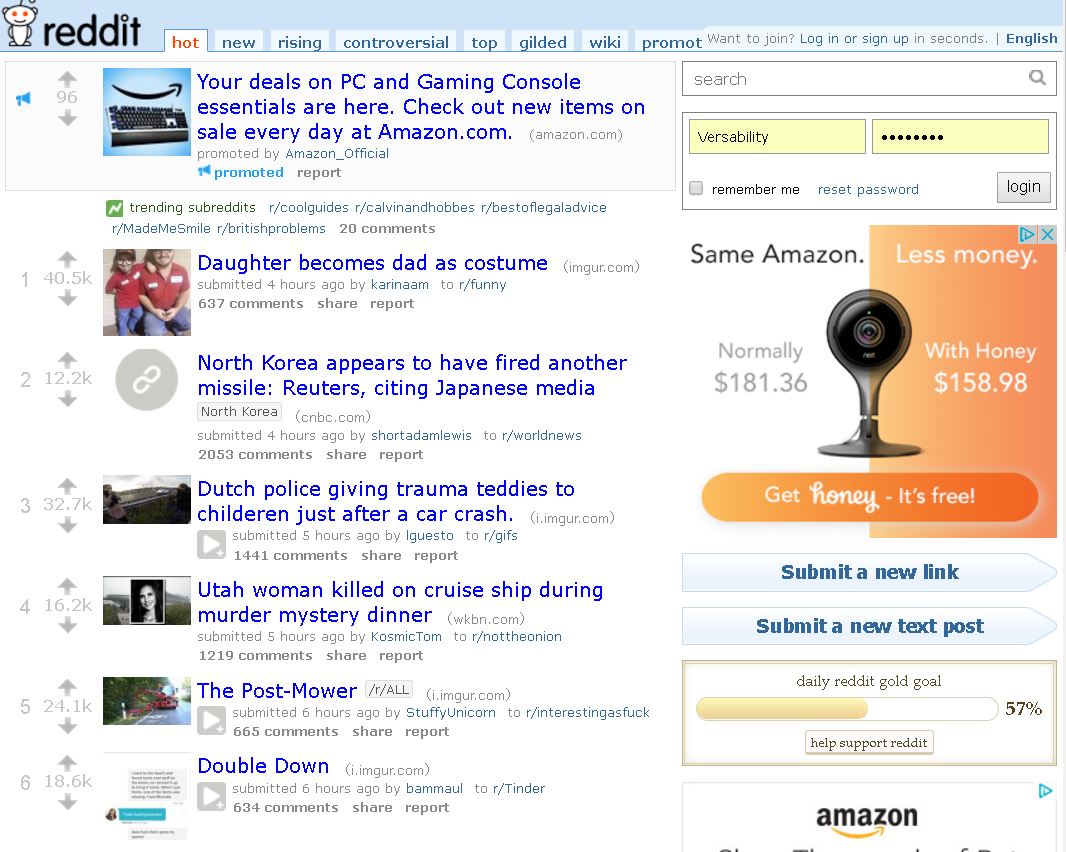
Reddit is a basic link aggregation site that takes all the bells and whistles away.
Reddit depends on the title and picture to encourage conversation and clicks.
Using meta tags correctly is equivalent to using the correct format for a business email.
Of course, you can put anything you want out there, but there is a level of professionalism expected at some point.
Even Amazon just gives you a picture, title, and brief description to get your point across.
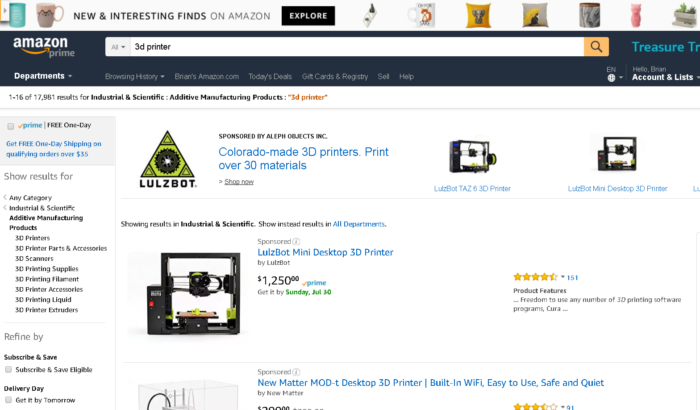
Think of these tags as your elevator clearance.
You have about as much space as a tweet to sell your entire brand and product.
Which means you have to nail it.
You can't just go to this detail and polish everything else. If you do this, nobody will see the rest of what you've polished.
We already know how meta tags affect SEO, but that's not the only element.
Meta tags make your email marketing and marketing automation easier by providing information for links sent through email.
Tags are a crucial element in determining what my automated social media posts look like.
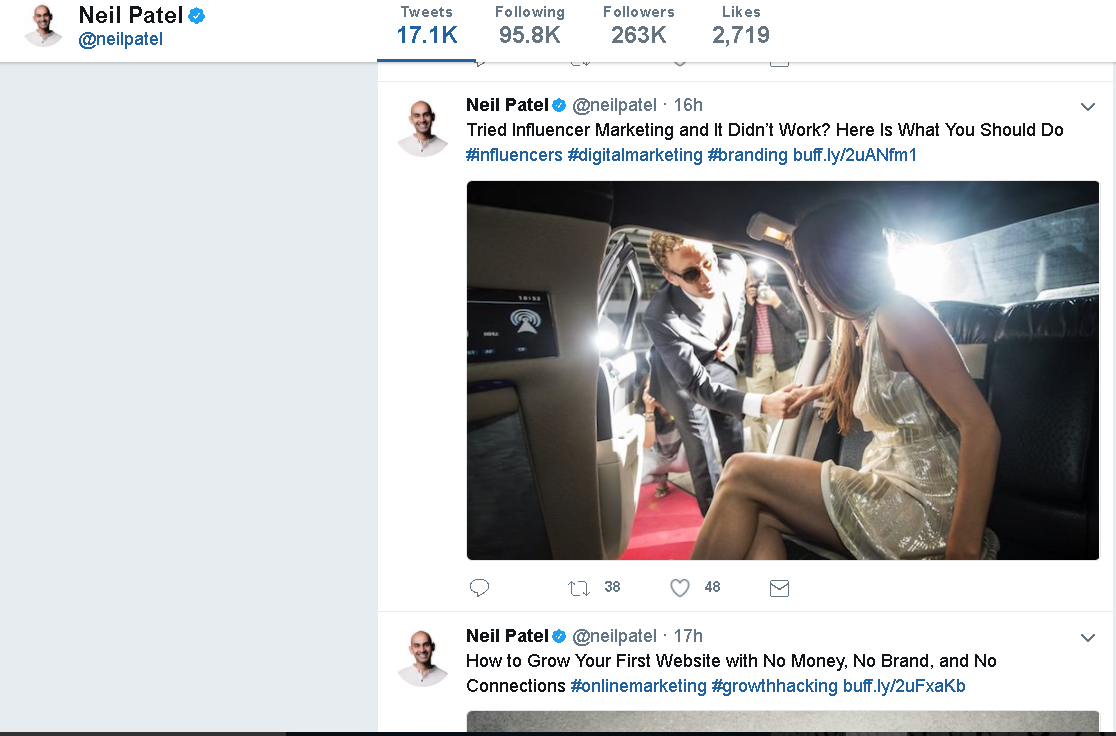
When other bloggers, YouTubers, and social media influencers (and micro-influencers) share your content, tags make it easy.
Think of meta tags as packaging for your product.
If your packaging doesn't fit exactly, no one will buy your product no matter how great it is!
What best practices should be implemented for tags?
Meta Tag Best Practices
There are a TON of different HTML tags that can be used on a web page. We're only going to focus on a handful of important tags.
We start with whoever might have brought you here today.
1. Title tags
It is technically not a meta tag, but it is displayed in the header and used as such.
As of July 2017, the character limits for title tags in Google search results are 78 on mobile and 70 on a desktop.
However, it doesn't necessarily mean that you should use all of these characters, and 60 is the generally recommended limit.
Long-tail keywords make a difference.
Here are the top meta titles in the SERPs for "How To Make Content Marketing Effective".
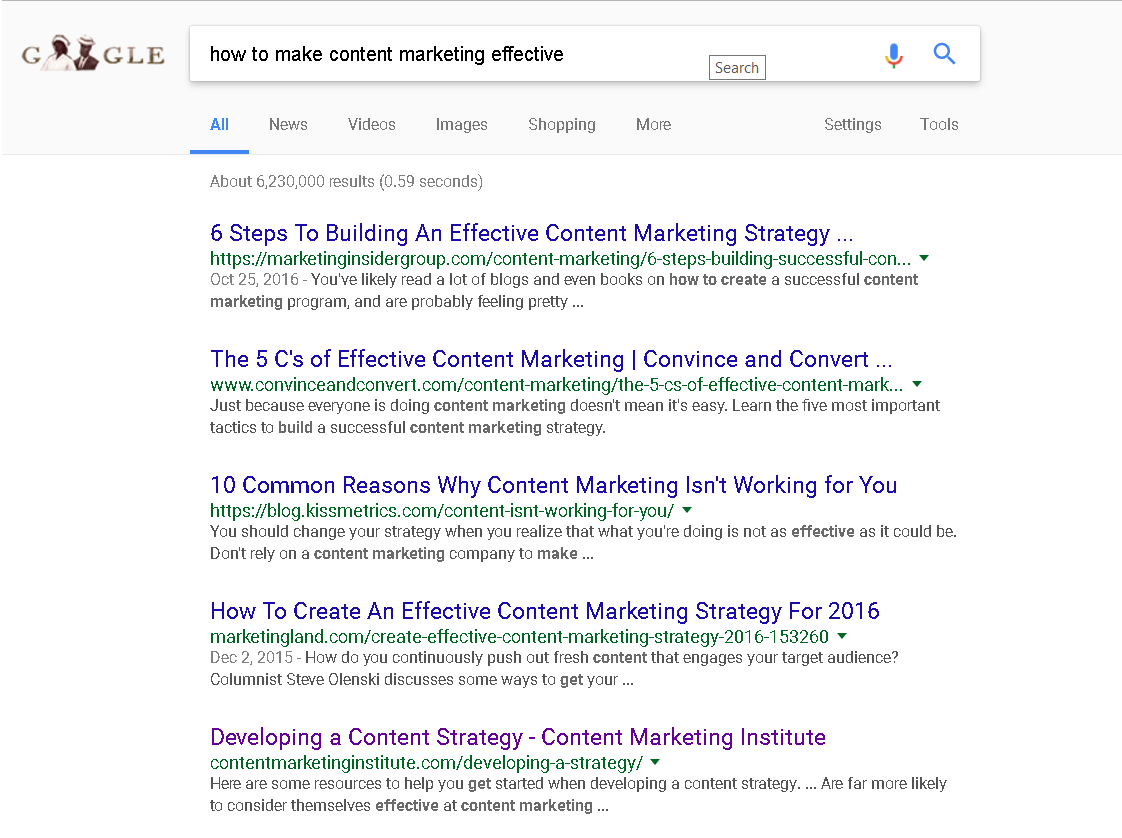
By adding the year we get a whole new set of results for “How To Make Content Marketing Effectively In 2017”.
Some users want basic information while others want the most current.
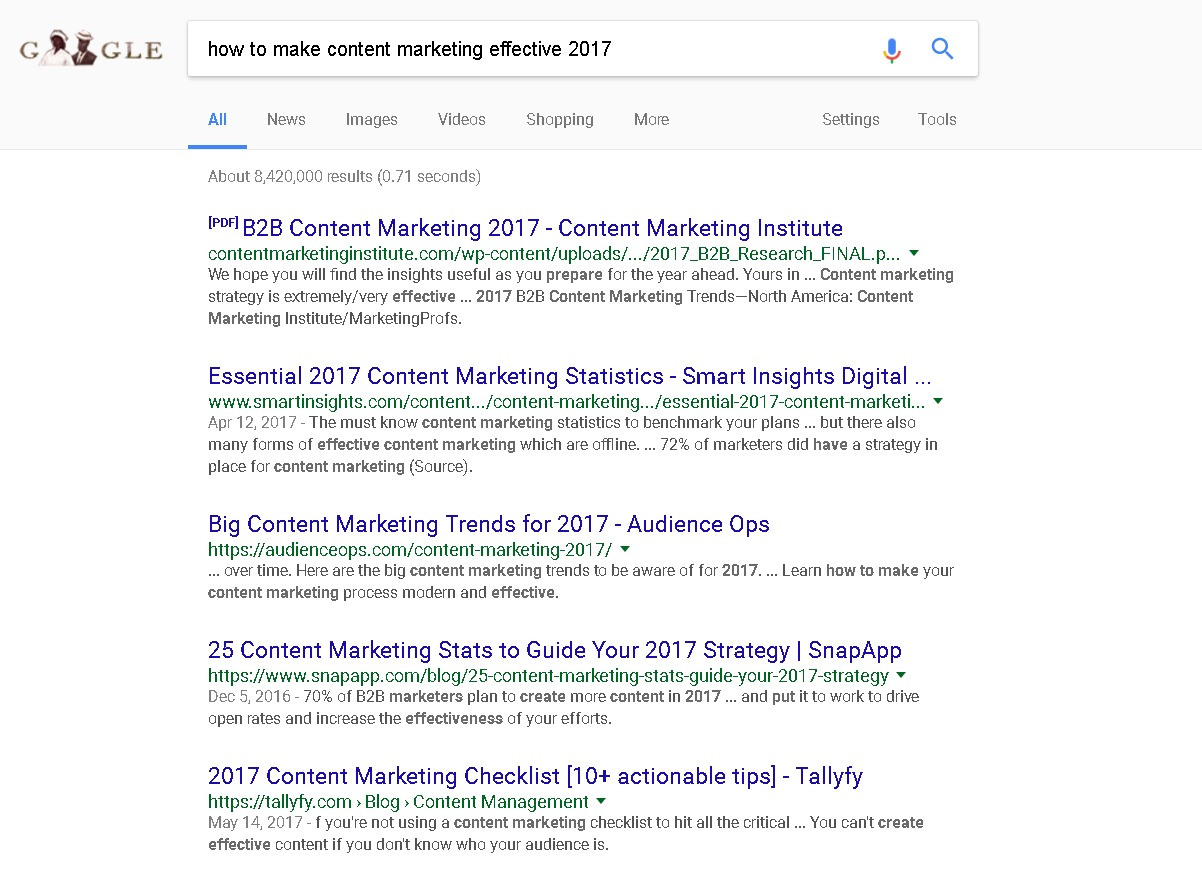
By adjusting our title tag, we can influence which of these search queries we rank for.
Ultimately, the goal is to meet both of them, but that's not always feasible.
Make sure your keyword is in your title. Otherwise, you can find your articles in the search results.
For example, if I search for "the best tacos in Tucson," I find a few restaurants on page 10, including Del Taco.
This is a missed opportunity for this country's taco capital!

These small businesses could significantly improve their search results, sales, and ROI by simply adding “Best Tacos in Tucson” to their title tags.
Here is an example of the HTML required for a title tag in your header.
In WordPress, it's so easy to give your page a title.
You really can't miss it.
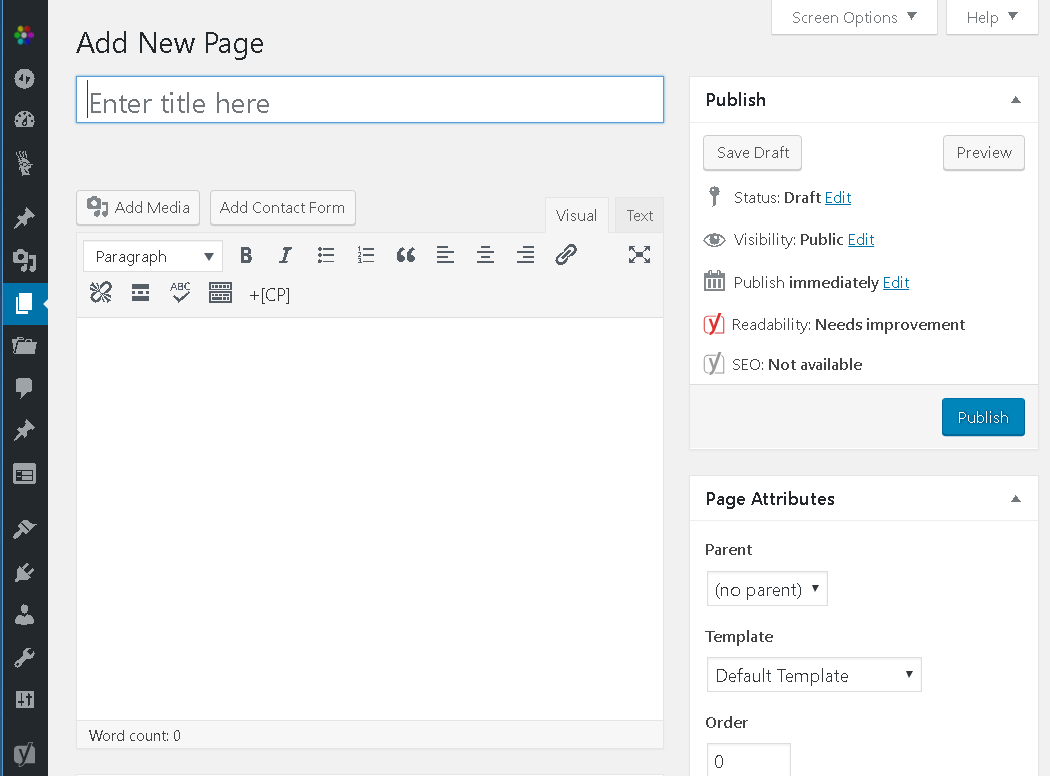
That's all there is to it!
2. Image tags
Like title tags, image tags are not marked with "Meta".
However, they are clearly used by search engines, link aggregators, and other websites to identify your website.
There are two picture descriptions that are actually combined in one day.
This is what the HTML looks like.
Both the alt and title tags should be defined for the best experience.
The title will appear on your screen when you hover over it.
The alternate text is displayed when the image cannot be rendered (or when speaking to the blind and visually impaired).
When you upload an image to WordPress, you will be prompted for the title, caption, alt text and description.
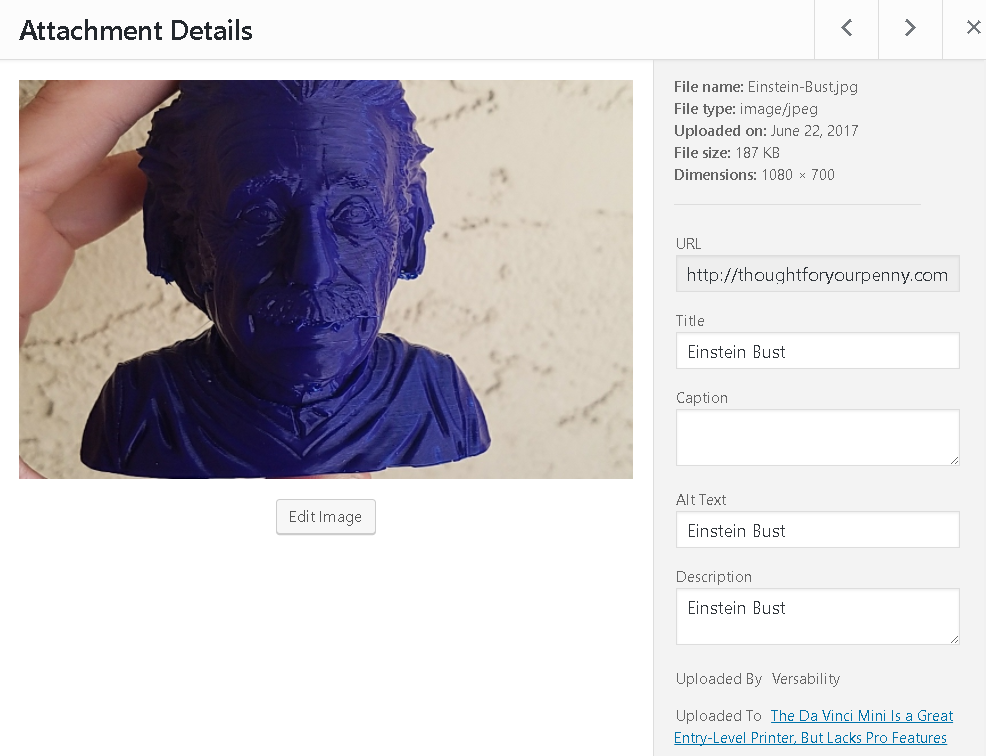
The more fields you fill in (even if you use the same information), the more searchable your images will be.
20 to 60% of all Google traffic goes to websites with well-optimized graphics.
Why don't you want to be included?
It's also about compliance with the ADA website.
There are approximately 58,200 people per million with some visual impairment in the United States alone.
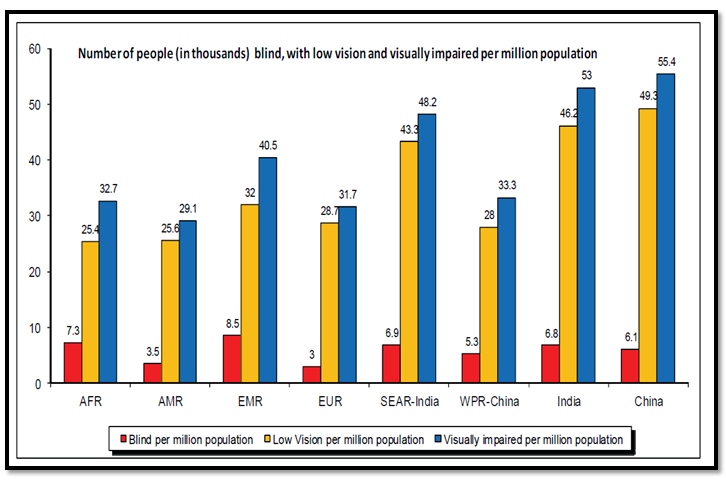
This is a huge segment of the population who would not have a great user experience without alternate image tags.
Optimize your images for search engines and users.
3. Description of meta tags
With a meta description tag you can give an overview of the content of the page.
They are limited to around 160 characters and are not at all directly linked to Google's search algorithms.
Again, the reason you need description tags is to improve the user experience.
Description tags encourage click-throughs.
This is what the HTML looks like:
Without a meta description, by default, Google will use the preview phrase that best encompasses the content.
This isn't necessarily a bad thing.
This post doesn't have a meta description (I rarely use it) and it ranks well.

Of course, my blogs are filled with relevant content in short, sweet sentences. Most of them would work as standalone descriptions.
However, it doesn't hurt to add extra information to make your content more searchable.
4. Robot Noindex and Nofollow Meta Tags
Robot meta tags are not always required.
By default, any pages and links you create on your website are indexed as "Follows" by search bots and web crawlers.
Whenever you want to redirect them, you need a robot meta tag.
Here is the HTML with no index:
(…)
This would be in the header and indicate that this page does not need to be indexed.
This is useful for syndicated and duplicate content that your customers / readers might be using, but you don't want credit in search indexes.
Here is the HTML for a robot that doesn't follow.
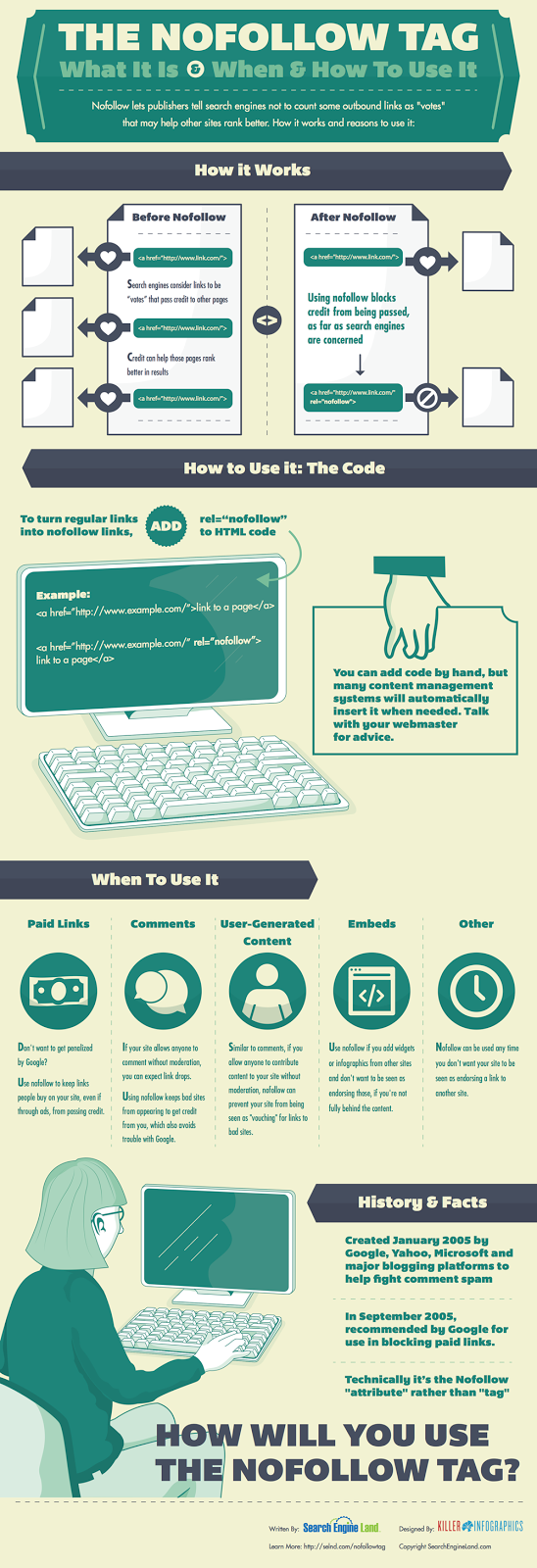
This is used for links that you don't necessarily want to endorse.
For example, readers who leave links in my comments are not exactly recommended by me. Hence, a nofollow tag above the comment section will keep my website clean for bots.
There's a great infographic here on when and how to use nofollow tags.
Now we come to one of the most controversial meta tags.
5. Keyword meta tags
Keyword tags are not used by search algorithms to determine search ranking.
This is what the HTML looks like:
I coach my SEO clients to ignore keyword tags as they don't affect SEO.
However, that doesn't necessarily make them useless. They are especially useful in WordPress.
Keyword tags and categories allow Google to determine which page of your website should be ranked for a search.
You also create a page in WordPress that provides another indexed page.
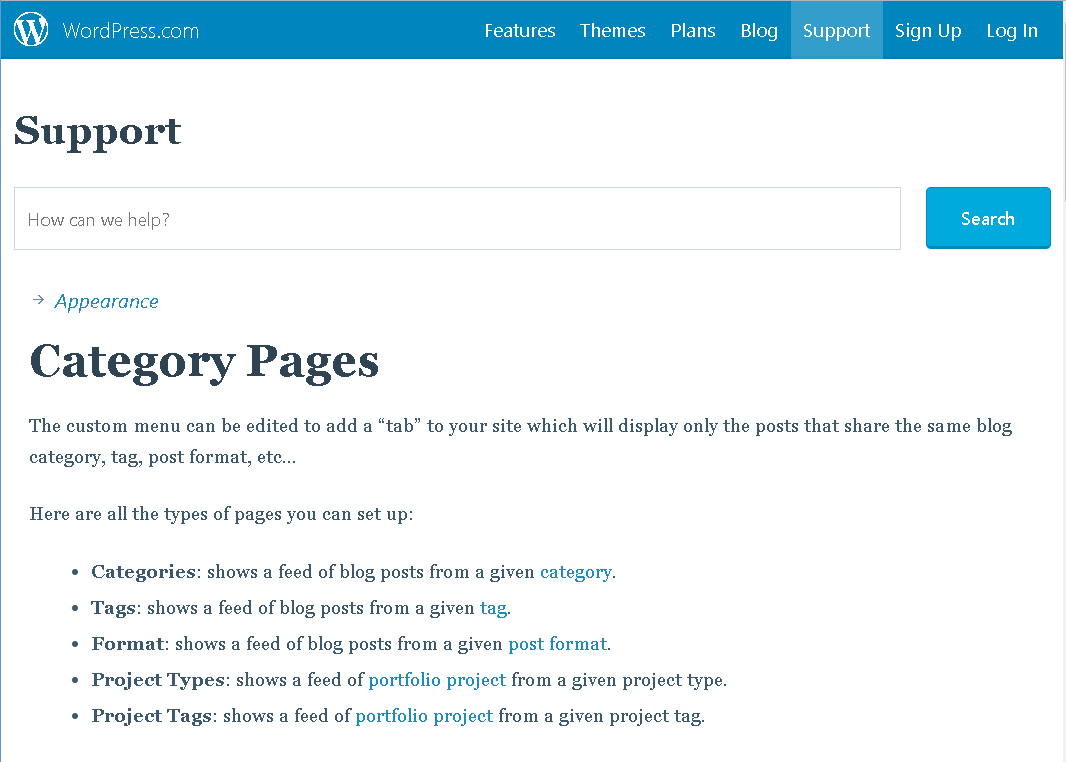
This means that while your blog posts will target long-tail keywords, your tag and category pages will have feeds that cover the shorter keywords.
Categories can be used for the URL format that add another keyword to the page address.
This is done under Settings – Permalinks in WordPress.
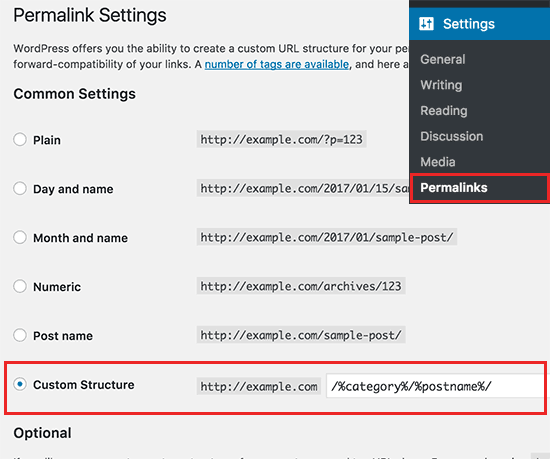
Adding this format gives you context about your content.
Google loves the context for search results!
Keywords also provide an overview of how many pages you have for each keyword.
You can use them to plan your editorial calendar.
6. Viewport tags
You don't spend a lot of time thinking about viewports, but they're especially important in today's mobile search world.
On mobile devices, pages are displayed in a pop-up window called a viewport that extends beyond the edge of the device.
Here is an illustration of what I am talking about.

Developers can set the size of the viewport to improve the usability for mobile devices.
WordPress users can check this tag to get this information for their templates.
But you probably didn't know this unless you're already a web developer.
As Google increasingly focuses on mobile-friendly websites, this meta tag can mean the difference between success and failure on mobile.
Now that you have a basic understanding of meta tags and why they are important, I'll show you some of my favorite tools for editing.
Free tools to add and review your meta tags
Don't worry if this all sounds overwhelming – there are tons of tools out there that make it easy to get meta tags right. Here are two of my favorites.
Yoast SEO plugin for WordPress
Yoast is a powerful SEO plugin for WordPress and one of the most downloaded SEO and meta tags tools.
With Yoast, all of the pages and posts you post have back-end options to improve social sharing, search engine optimization, update tags, and other metadata.
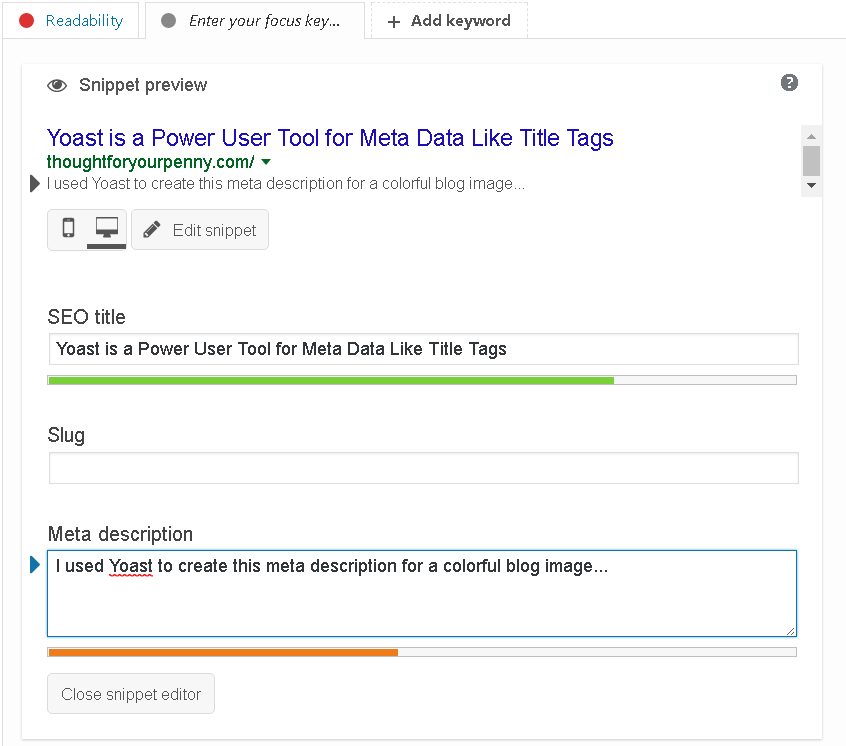
With Yoast installed on your WordPress site, it only takes a few clicks and a few seconds of your time to add meta-tagging to your process.
Yoast also lets you enter a focus keyword that won't be added to the meta tags so the back-end program can analyze your post.
BuzzStream Meta Tag Extractor
When you need a quick graph of the metadata being used by your competition, BuzzStream's Meta Tag Extractor is a sleek and simple solution.
If you copy and paste a list of URLs, you will see the meta tag information.
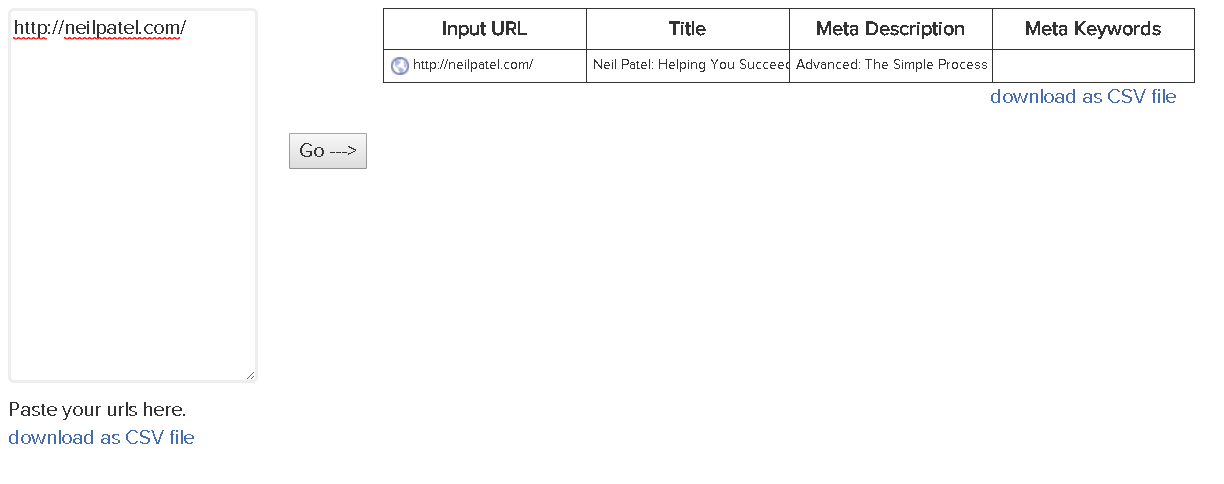
There's even an option to download as a CSV file so you can quickly scratch large lists.
That way, you can quickly and easily organize this data as needed.
This free online tool does its job with no frills.
Less popular (but still useful!) Meta tags
To be completely transparent, here is a diagram with HTML meta tags.
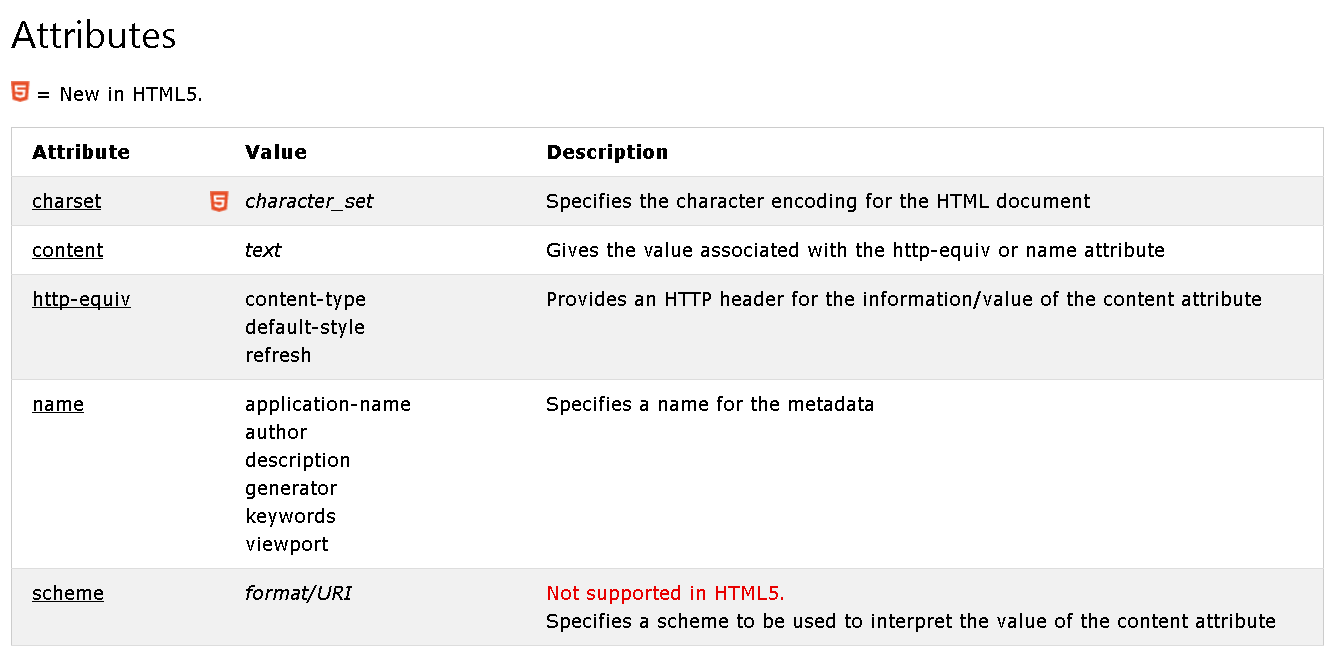
An author meta tag can be used to let search engines know who wrote a piece of content.
In the past, authors were used for search results, but this is no longer a factor. However, you can use author tags if you are running a multi-author blog.
WordPress adds this information to blogs when multiple users contribute content.
It's more of a badge of honor for bloggers than anything else.
Most of the others define parameters that should already be controlled at the server level.
While I ignored these meta tags, that doesn't mean you have to. You can add any information at any time.
It doesn't help in finding rankings, but it doesn't harm them either.
Conclusion
Meta tags are a fundamental part of HTML – and can have an impact on search engine optimization.
In the early days of the internet, they were a signaling factor for search engines to understand what content was on a page.
The internet (and our relationship with it) has grown exponentially since then.
Contextual search, digital AI assistants, and mobile devices are changing the way we display content.
Search engines are encouraged to provide the best possible search results so meta tags are less important.
However, some, like the titles and meta descriptions, are more important than ever.
Although less metadata is used, it's still the first impression you make on both robots and people.
What do your website's meta tags say about you?