
Find out how to create and use Fb polls
You can use Facebook polls to clear up your audience's problems, what to create next, and how they really feel about your brand. While it can help you make more strategic business decisions, Facebook polls can do other wonderful things for your online presence like:
- Increase Your Facebook Page Engagement (asking questions is one of the best ways to generate high engagement).
- Help beat the newsfeed algorithm with no ads
- Promote a strong sense of community around your brand
In this post, you will learn how to create different surveys on Facebook, how to use them effectively, and how surveying your target audience can help your company grow.
How to create Facebook polls
Gone are the days when you could create a Facebook poll from your news feed or timeline. Currently, you can only share a poll in a Facebook group, story, event page, or Messenger.
Facebook group polls
Facebook groups are one of the best tools for brands on the social media platform. You can create a community and improve customer loyalty.
While business pages struggle to achieve organic reach above 5%, Facebook groups differ. The algorithm pushes group posts to newsfeeds, which means you'll have much higher organic reach without paying for ads.
The following are the steps to create a survey in your group with an actual profile and an example company page.
Step 1: go to your group
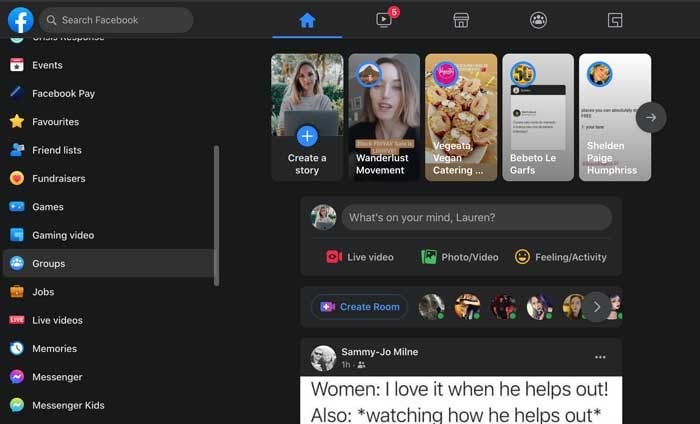
Go to your Facebook news feed on your desktop or mobile phone, click the Groups icon in the menu on the left and select the group for your survey.
Step 2: create a post
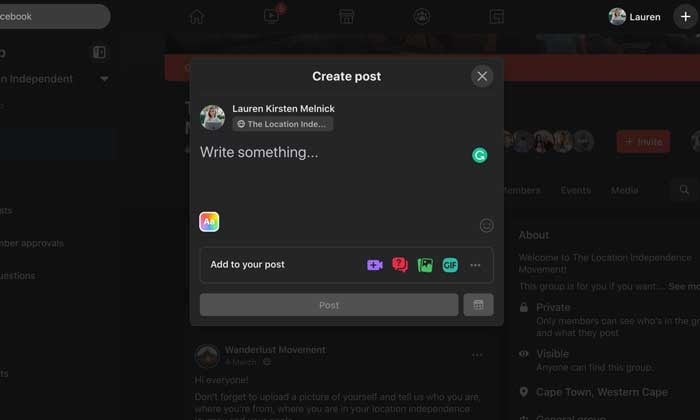
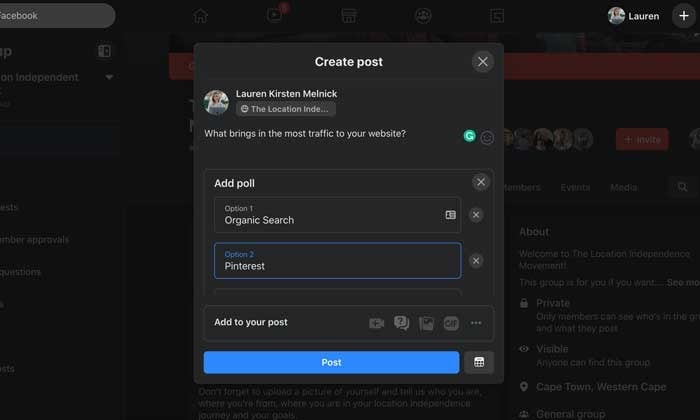
Click on the “What's bothering you?” Section to make a post. When the pop-up loads, navigate to the "Add to Your Post" section and click the three dots for more options.
Step 3: create your survey
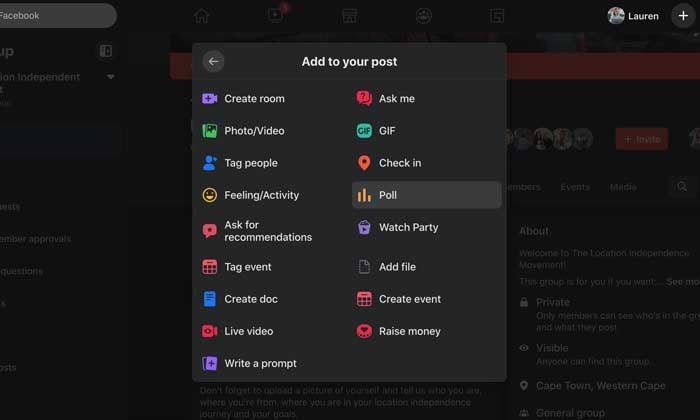
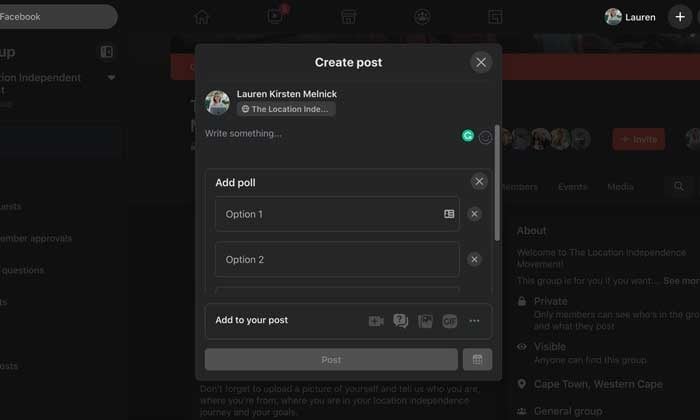
A new "Add to Your Post" screen will load with several options. Select "Poll" from the list. You will be returned to the Create Post pop-up and can add your poll options in the Write Something section.
Step 4: Publish your survey
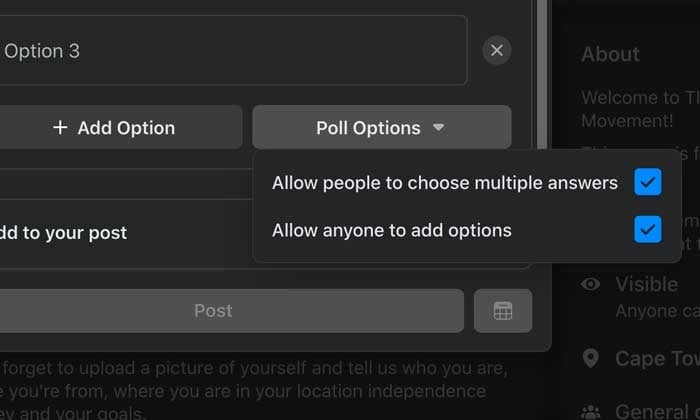
When you've added all of your options, click Poll Options. Here you can choose whether people can add options and vote for more than one option.
When you're done, click Post.
Facebook story polls
With 250 million people using Stories every day and the primary foundation in users' newsfeeds, creating a survey is an invaluable (and fun!) Way to engage with your audience.
Let's see how to do it.
Step 1: Open the Facebook app on your smartphone
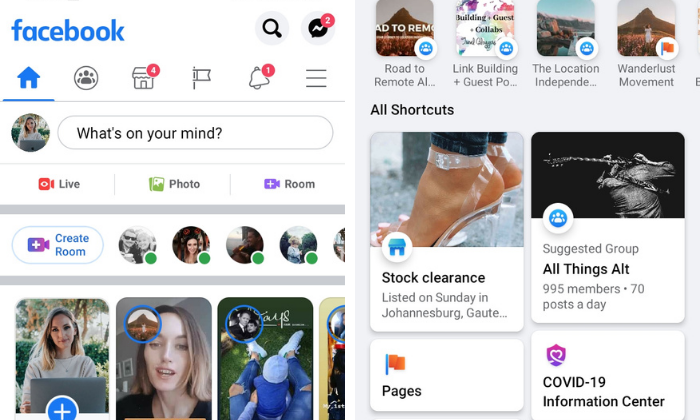
Navigate to your Facebook page by tapping the hamburger icon on the left side of the screen. You can see your page in your shortcuts area or by scrolling down and tapping the Pages button.
Step 2: create a new story
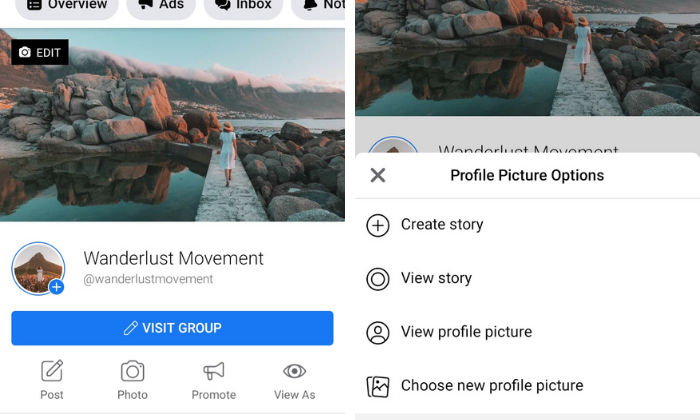
Tap the blue circle with the plus sign around your profile picture and select "Create Story" from the drop-down list.
Step 3: create a survey
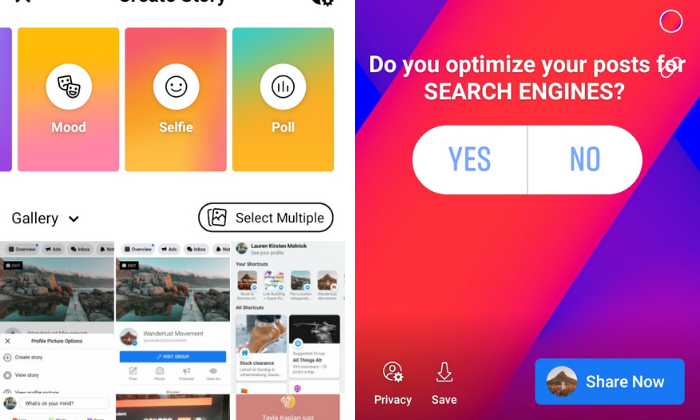
Swipe left until you see the Poll card. Write your question and customize the Yes and No options.
Choose a gradient background or upload a photo from your camera roll.
When you're done, tap the Share Now button.
Your followers will see the percentage of those who voted for which option, but only you can see how many votes each option received and how each person voted.
Facebook Messenger surveys
While you can no longer post polls in your news feed, Facebook has added the ability to group chats in Messenger for your personal account.
Hopefully Facebook will add the chat feature for company pages. This would be a great way to conduct quick customer satisfaction surveys.
Find out how to do it.
Step 1: Open a group chat or create a new one
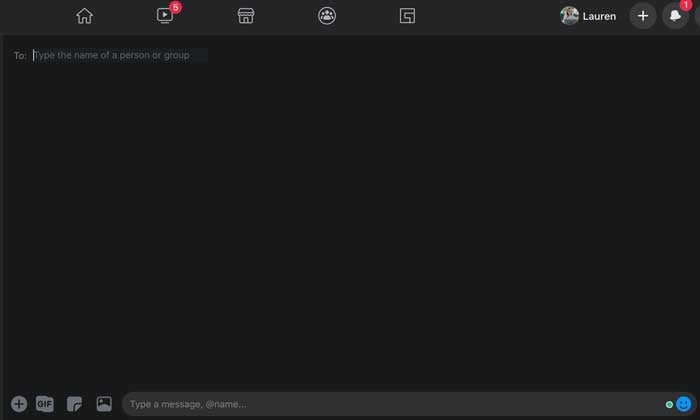
Step 2: At the bottom of the Messenger window, tap next to the text on the "+" box
Step 3: Select the query icon and enter your question
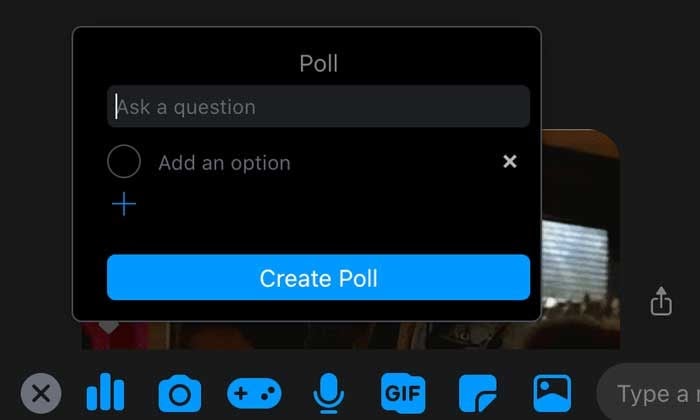
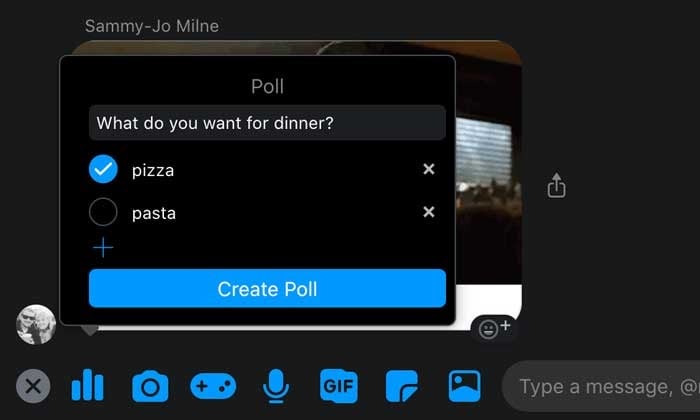
Step 4: Add your options and tap "Create Poll".
That way, you can share it with your group.
Event page polls
Polls are a powerful feature for brands hosting in-person or virtual events.
You can create one to include valuable information on details such as:
- Which place, which date or which time is suitable for everyone.
- Participants' opinions on the course of the event.
- How many people would like certain catering options.
- Vote on itinerary options.
Step 1: Go to the event
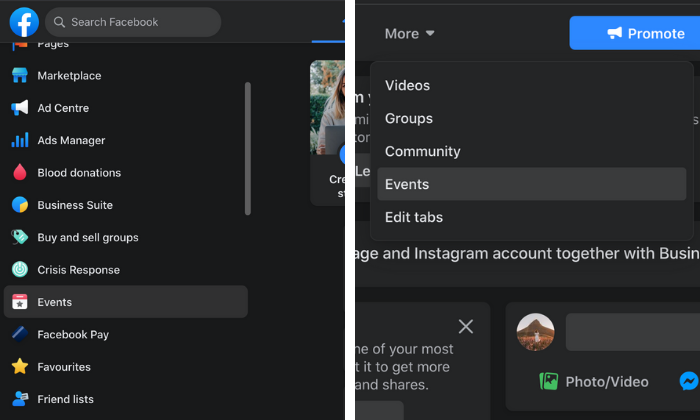
Log into your Facebook account and click on "Events" on the left side of the screen. If you don't see the event icon, click the Expand button and scroll down until you see it.
For events created by a Facebook Company Page, go straight to the Events tab on your Page.
Step 2: create a post
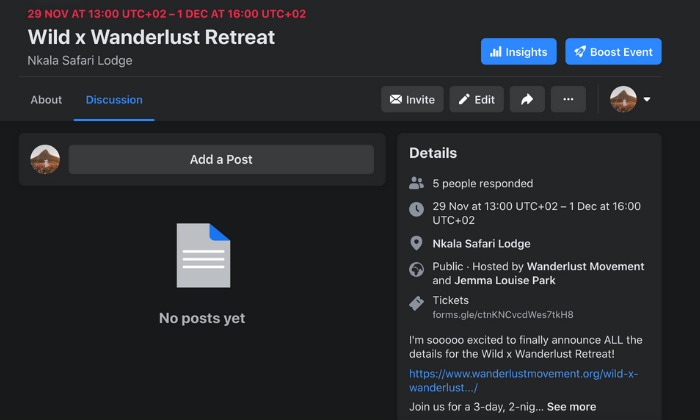
Select the event you want, click the Discussion tab and select Add Post.
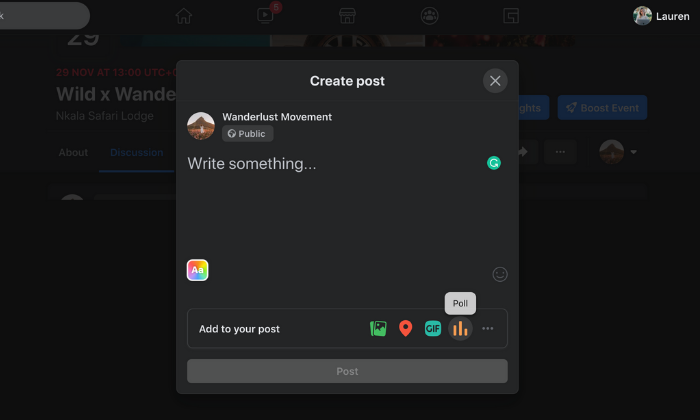
A new window will open and you will see the poll icon on the right side of the "Add a Post" section.
If you don't see it, tap the three dots to expand the post options.
Step 3: create a survey
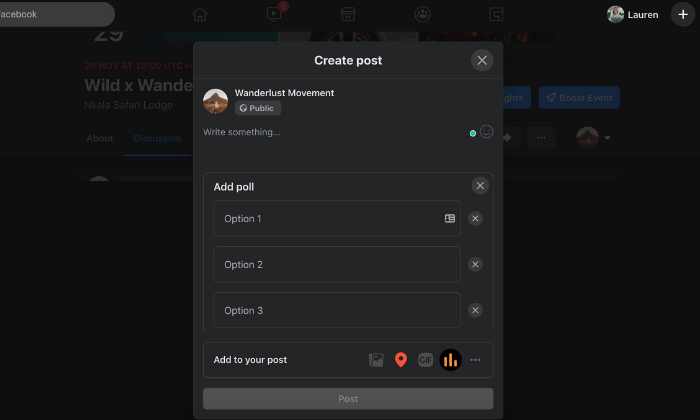
Click the poll icon and you will be returned to the Create Post screen where you can add your question and options.
You can add more possible answers by clicking "+ Add Option". Use Poll Options to allow users to add options and people to enable / disable multiple responses.
When you're ready to post, click the "Post" button to add them to your event page.
Facebook video polls
With 500 million Facebook users watching videos every day, you can't go wrong adding video content to your marketing mix.
But how do you get people to look into it once it's out?
Video polls.
This is a quick and easy way to personalize a viewer's viewing experience and get them to get out of passively consuming content.
We'll tell you how to do it below.
Step 1: Upload a video to your Facebook page
You can also go to Creator Studio to edit a video that you've already posted on your page.
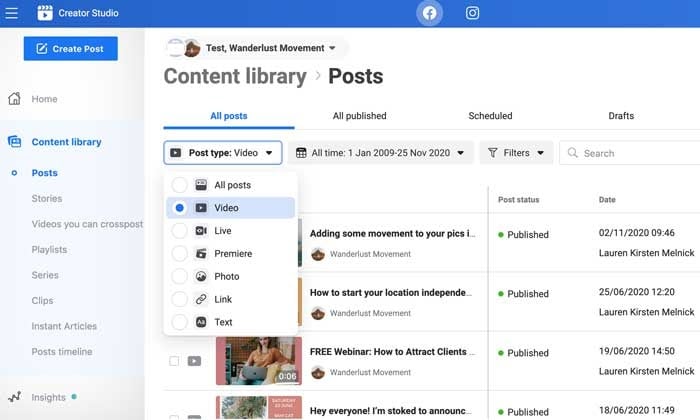
Step 2: Click the "Edit Post" button
A new window will be loaded where you can edit the title, caption and tags of your video.
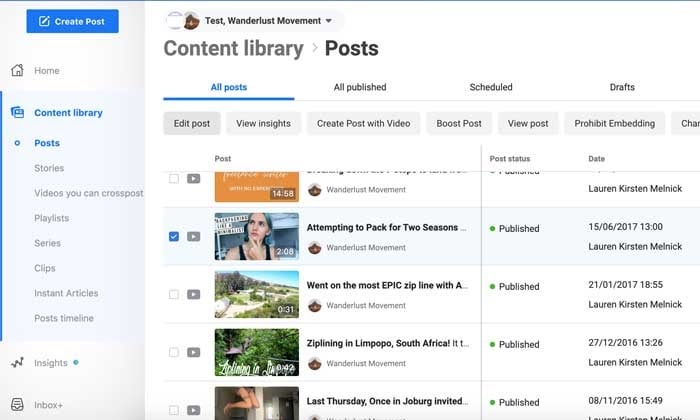
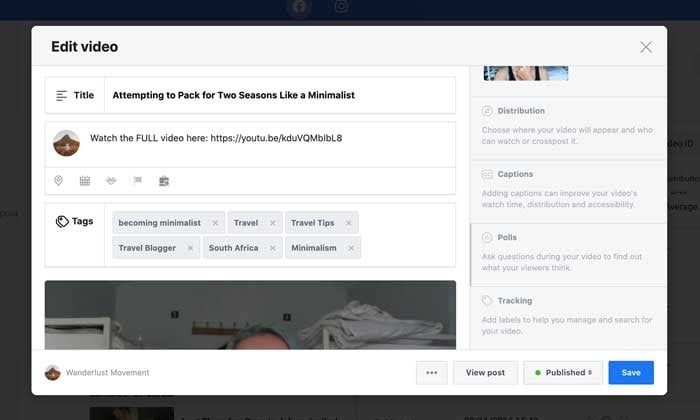
Step 3: Select the "Polls" option
Scroll down on the right side of the popup until you see a greyed out "Survey" section.
Select it and click the blue "Create Poll" button.
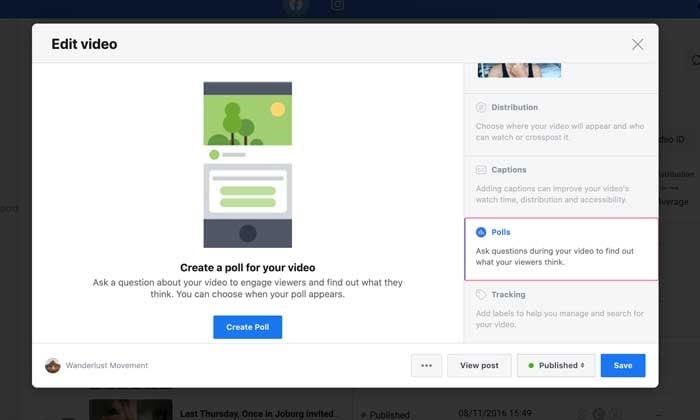
Step 4: ask your question
On the left side of the popup, your video will be displayed with a slider. You can move it to the area of your video where you want the poll to appear.
On the right side you can enter your question and answer options. By default there are only two options initially. However, you can add up to six by clicking the "+ Add Another Option" button.
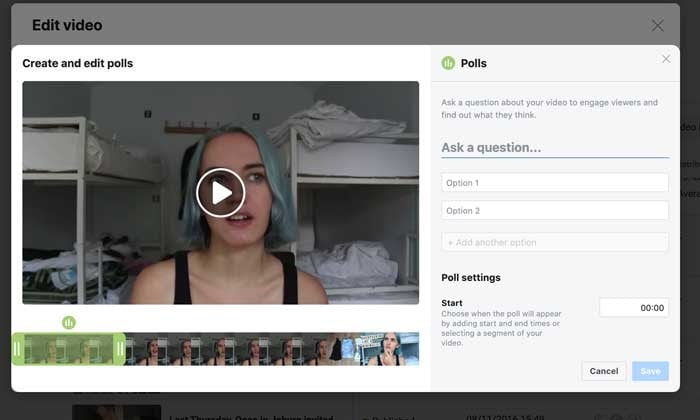
Step 5: Choose your survey settings
Keep scrolling down to complete your survey settings. You can specify when you want the survey to appear, how long you want it to last, and when you want to publish the results.
Step 6: Save your Facebook video poll
When you are happy with your survey, click the "Save" button to start collecting results.
5 Ways To Use Facebook Polls To Grow Your Business
Here are a few ways you can survey your audience to grow your community and generate more sales.
Create different types of Facebook polls
You don't have to stick to boring old text polls. Facebook is a great way to spice things up and put an end to the pointless scrolling of tracks by adding pictures and GIFs to your polls.
Use the different options to get creative, show off your brand personality and drive engagement.
Ask the right questions
Polls are a great way to start a discussion in your community and conduct valuable market research.
For example, if you're creating a survey on content marketing, you can ask questions like:
- "Are you seeing results from your content marketing?"
- "What's your biggest battle with content marketing?"
- "Are you struggling to get ROI from your content marketing?"
You can use the results to plan your content calendar, come up with a new offering, or create a piece of gated content that your audience will love.
Gather feedback from your target audience
Host a free training session for your private Facebook group community? Get feedback on how your audience enjoyed the content with a survey. Instead of guessing if your training resonated with your community, you can ask them directly and use the feedback to optimize your content. A short survey like "Did you find the training actionable and easy to understand?" will do the trick.
Learn more about your target audience
Your Facebook surveys don't have to be done every day for business alone. This feature lets you go beyond basic demographics and find out what makes your audience tick.
For example:
- Which colors do you prefer?
- Who are your favorite influencers?
- Where do they hang out online and offline?
- What are your greatest values?
- What is the big goal that you are working towards?
Surveys can collect meaningful information that can help make your brand more understandable and marketable to your audience.
Use a touch of controversy
Do you want to spark some engagement? Create a survey on two different schools of thought in your industry.
For example, if you work with freelancers, you might ask, "Do you find platforms like Upwork and Fiverr valuable for landing clients?"
There are strong opinions about the pros and cons of using Content Mills, and this is a hot topic in the freelance community. When you create a poll on it, it shows likes and comments and forces the algorithm to forward them to more users.
How Facebook Surveys Can Help Your Business
Still not convinced about the impact Facebook polls can have on your business? So they can increase audience engagement and brand awareness and help you sell your products before you are ready to go to market.
Increase your engagement and brand awareness
As AdWeek points out, consumer engagement with brands on Facebook is volatile. Polls are an easy way to encourage your community to engage with your content and build a relationship with your fans.
With several interaction options (like, comment, share) you can feed the algorithm all the signals it needs to send your contribution to more and more users. Polls break the monotonous scrolling and allow them to give their opinion quickly and easily.
Figure out what to create next
The key to running a successful online business is creating the things your audience wants.
While keyword and market research can go a long way, once you've built a community, it's better to get straight to the source. Use a poll to ask your followers what they'd like to see next.
For example, you can offer different topic ideas for your next blog post, YouTube video, or your next online course. Can't decide which color to use for your new t-shirt designs? Create a poll and give your audience what they want!
Stir up Interest before starting
Before your next start, use surveys to test your new products or services. For example, if you're a clothing company, you can post pictures of your upcoming hoodies and ask people to vote on their favorite style. This way, you can not only see what will resonate with your audience, but also create anticipation for your launch.
Discover the opinion of your followers
Do you remember the old days of focus groups as a marketing tactic? With surveys, you can get the same results for FREE and in less time.
Use Facebook polls to find out:
- What your followers like about your brand.
- What they would change.
- Your general opinion about your products or services.
Once you know what people are saying, it is much easier to speak their "language", change things, and tailor your marketing messages to meet the wants and needs of your audience.
Conclusion
Surveys are an important tool for any brand. You are an immediate link to how your audience feels about you, their struggles, and how best to solve their problems.
By asking the right questions, you can tailor your digital marketing strategy to meet the needs of your followers and make them feel like “WOW this was done for me”.
How are you going to use Facebook surveys to better serve your customers?