
Learn how to Create the Greatest Responsive Search Advertisements
There are more ways than ever to use digital AI to optimize the marketing funnel, including responsive ads.
In the early stages of digital marketing, if you want to find out if an ad copy is effective, you need to manually test your ads across location, age, and demographics.
This process can take months to see real results, and even then you may not get the information you want.
These days, you don't have to waste your time manually testing ad copies.
Responsive Search Ads lets you use Google's high quality algorithms to create great ads that will change over time for the best results.
What are responsive search ads?
With Responsive Search Ads (RSAs), you can automatically adjust your headings and descriptions to determine the most effective pairing of your targeted ads. This is an easy and strategic way to update your automated PPC ads.
For responsive search ads, Google will automatically determine the best ad combinations and discard ineffective ads. This means that you no longer have to rummage through stacks of data, compare ad sets and leave your ROAS to chance.
With responsive search ads, you can:
- Get the right message across at the best time
- Optimize your ad process and save time
- Boost your engagement metrics with accurate reports
- Reach more customers with different headlines that will allow you to participate in more auctions and inquiries
Responsive search ads tend to have higher click-through rates (CTR) than regular ads. This is because they deliver relevant, tailored content and show up in more consumer searches.
How big are responsive search ads?
Responsive search ads show more text than traditional expanded text ads and can contain three headings of 30 characters each and two separate descriptions of 90 characters each. That's almost twice as much as regular expanded text ads.

Google offers up to 15 different headings and four description options that can help you maximize your advertising potential. You can then mix these up into 40,000 different options to best suit your consumer's characteristics.
How to create responsive search ads
Setting up your responsive search ads can easily be done in your Google Ads account. Make sure you are always up to date with Google Ad Hacks to keep your ROI up to date.
Open your Google Ads account
Start from your Google Ads dashboard and navigate to the left of the screen. You should see an option to use Responsive Ad Builder for searches. If you don't see this feature, you may not have access to this feature yet. Contact Google to find out what your options are.
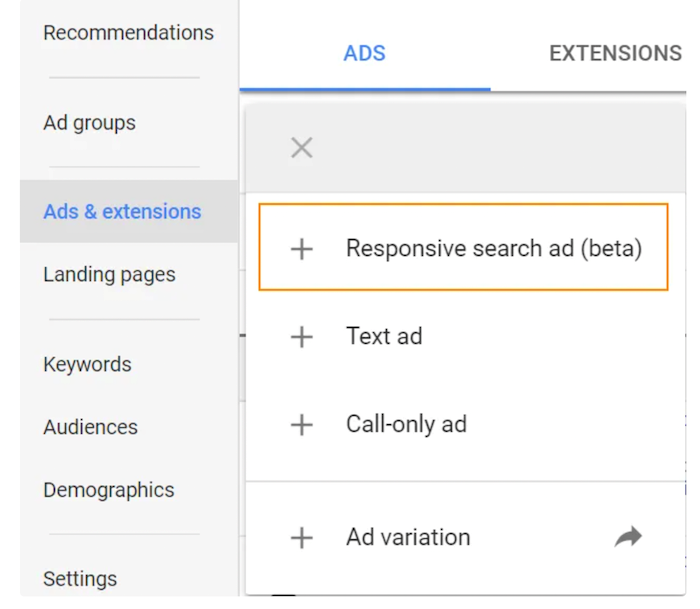
Create your responsive search ad headings
Next, add your headings to the open lines. Remember, you are testing your copy so make each headline unique. Too many similar headlines may not give you an accurate picture of your campaign.
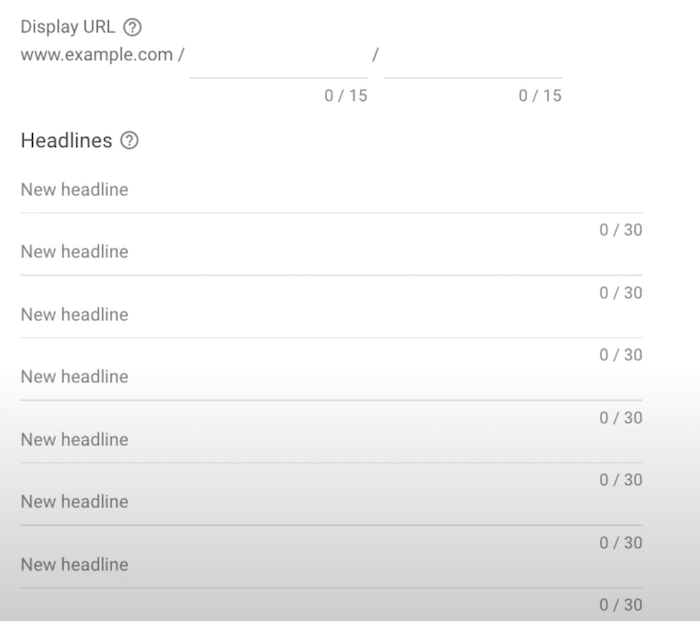
Also, keep in mind that the more headings you enter, the more likely it is for Google to deliver ads that best match users' search terms.
Pin relevant headings
You can pin your headings by selecting the pin icon to the right of the heading. This allows you to display a heading in a specific order instead of leaving the positioning to Google.
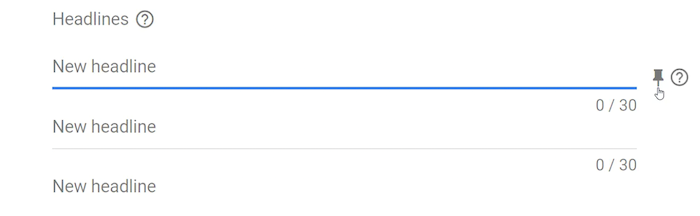
From here you can choose whether you want to place your headline in the first, second or third position. Pinning only one heading prevents other headings from being used at that point. Google recommends that you only use this feature if you are an experienced ad tester, as it will affect the ability of the responsive search ad software.
Add your Responsive Search ad descriptions
You can enter up to four descriptions using Google. Your ads will show up to two at a time.
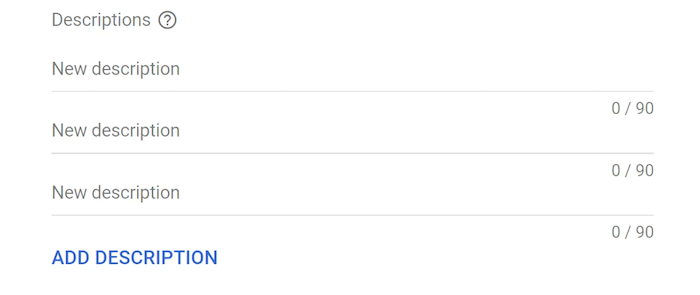
Like your headings, you can pin descriptions in the first and second positions.
Remember, responsive search ads with more headings and descriptions work best because they are designed to test and optimize your copy. The more you give Google, the more it can give you in return.
Benefits of Responsive Search Ads
Combined with Google's intelligent machine learning, responsive search ads provide insights into thousands of variations of ad combinations.
With responsive search ads, Google does the heavy lifting of advertising testing for you and finding the most effective content to deliver to your target audience. Not only does this save you time in the short term, it also provides a lot of data that you can use in future campaigns.
The best part? Google does all of this for free. All you have to do is pay your regular PPC fees and let Google take over from there.
What Types of Businesses Can Benefit from Responsive Search Ads?
If you're already running PPC Google Ads and testing different variations of copies and content, you can take advantage of responsive search ads.
By using Google's AI capabilities that reduce the time you spend creating and testing ads, you can better focus your time on growing your business while curating large amounts of data that you use in many aspects of your business can.
Tips for creating headline and text variations for responsive ads
Responsive search ads use machine learning to optimize your campaigns. However, they won't work well if you don't have the correct headings and descriptions.
Running successful Responsive Search ads starts with your copy. Here are some tips for making a convincing RSA copy:
Use clear and varied headings
It's important to create different headings so that Google can test accurately. When writing your headings, make sure that no two headings look the same or contain wordings that are too similar.
Make sure to follow the gauge on the top right of the screen to see how your headings are doing.
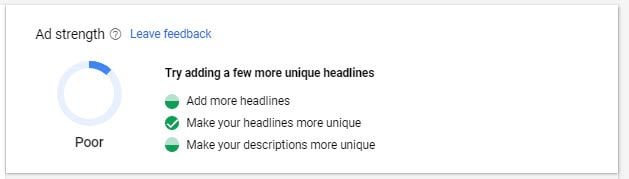
There is no need to maximize the number of characters you have in each heading. As with all things digital, less is usually more. As you create your headlines, focus on your copywriting skills and write short, expressive content that will attract your audience and cement your brand message.
You can also rewrite or reuse headings from previous Expanded Search Ads that you've used if they've performed well.
Use keywords sparingly
As you create, think about your keywords and make sure that each heading is relevant to the keywords you choose. Great Google Ads campaign management starts with a foundation for keyword research.
If you want to test the effectiveness of your keywords, add a headline or two that don't include your keyword and see how they work. You can do this with different test groups to test the keyword strengths against each other.
It's also a good idea to use Dynamic Keyword Insertion (DKI) which allows you to customize keywords based on user search settings.
For example, if you sell winter coats, your keyword might be "jackets". With dynamic keyword insertion, you can display your content to users searching for “winter jackets,” “rain jackets,” and even “lightweight jackets”. This tactic improves the reach of your keyword and ensures that your target audience gets the most relevant information available.
Follow Google's recommendations
If you haven't used responsive search ads before, you might see prompts on your Google Ads dashboard asking you to get started. As you click through the prompts, you may find that Google has already created some headings and descriptions based on what they already have about your business.
Review the recommendations and make the necessary changes. Then take the exam!
Google also makes recommendations based on your landing page copy and other ads you might run. They are not always the right choice, but they often contain relevant keywords and useful tips that can save you time when making a new copy.
Pin relevant headlines, but don't overdo it
Pinning headings and descriptions is a great way to showcase relevant offers like limited-time offers or your latest sales.
While pinning can help send important messages to your audience, don't overdo it. If you freeze too much, Google's machine learning skills will be affected and your ads won't be able to deliver the best data.
If this is your first time starting creating your responsive search ads, we recommend not nailing anything down for the first few weeks until you have a good amount of data to think about.
Use CTAs in your descriptions
Your descriptions are where you can land your messages. It is recommended that you add relevant descriptions to your descriptions in order to guide users to the actions they should take.
Think about what actions you want specific users in your demographic to take. For example, a brand new customer can be presented with a "Learn More" CTA, while a returning customer can be offered a discount or coupon code.
As with your headings, make your descriptions unique and varied to get the most out of your tests.
Try one responsive search ad per audience group
Testing more than one responsive search ad per audience group can result in inconsistent and incomplete data. Make sure you target your RSAs at specific audiences and locations, and don't spread too thinly.
If you try to talk to everyone, you won't end up talking to anyone.
Conclusion
Responsive search ads can be a great way to get more qualified leads and improve your conversion rates.
By leveraging effective machine learning software from Google, you can cut the time it takes to test and retest your ads and get back to focus on growing your business.
Remember, the more information you give Google, the more you get in return. So take the time to create strong headlines and descriptions so that your ads get the best launching spot.
What results have you seen with responsive search ads?