
The way to merge Instagram accounts
Managing a social media account is a lot of work. In many cases, managing two or more (if you don't need both) can be a nightmare.
Therefore, if you have many accounts on the same platform, it is best to merge them.
Fortunately, platforms like Facebook make this easy, as long as you are the admin of both accounts you want to merge and the two accounts have similar target demographics.
However, can you merge Instagram accounts?
The simple answer is no, currently not.
However, there are ways that you can merge Instagram accounts. We'll have a look at them in a moment.
Why should you merge your Instagram accounts?
Before we get into how to merge your Instagram accounts, you need to determine why you want to merge your accounts.
What would you like to achieve by merging your accounts?
Are you merging business and personal accounts?
Do you have multiple company pages and have problems maintaining them?
Instagram Marketing is a powerful tool for achieving your business goals. If you have two or more Instagram accounts, it is best to merge them. Here's why.
Consolidate your content
One of the main reasons many companies are choosing to consolidate Instagram accounts is to consolidate their content.
For example, if you have multiple accounts for different locations, you may want to consolidate your content to make it easier to manage your account.
Offer your followers a better user experience
Another great reason for merging your Instagram accounts is that you can provide a positive user experience (UX) for your followers.
This is because they don't have to switch from one account to another to get the most out of your content. A better UX will also help you build a stronger following.
Build a stronger brand
When you bring all of your assets together under one roof, whether you are merging a business and personal account or two (or more) business accounts, you can create a stronger brand.
Humanize your brand
It is easier for people to follow a personality than it is a brand.
Merging your personal and business Instagram accounts will humanize your brand and help you connect better with your audience.
Adds variety
Another great reason for merging your Instagram accounts is that you can use it to add variety to your account. It helps increase diversity in terms of content, target audience, and even monetization methods.
Merging Instagram accounts is also a great way to keep your followers motivated. This is because you can post different types of content that can spice up your feed. Aside from that, it will also help you streamline your marketing efforts which will result in you generating more leads and revenue.
So how do you merge Instagram accounts?
How to manage two Instagram accounts when a business consolidation takes place
Business consolidation occurs when two organizations are merged into a single business operation.
In this case, you will need to manage both companies' Instagram accounts. To make sure the process goes as smoothly as possible, keep your followers informed of the changes.
People don't like change – especially when it's quick.
This is why you need to keep them informed about your consolidation. Using both Instagram accounts, create posts explaining to your audience what the consolidation means and how it benefits them. Make sure you tag the other account when posting.
Once your followers have been notified, you can proceed with the merging.
Merging your Instagram accounts
It is advisable to merge Instagram accounts when there is a business consolidation. Remember, Instagram does not allow two or more accounts to be merged. However, there are ways to get around this. Here are a few options:
Create a new account
One way to merge your two accounts is to create a new account and manually transfer the content from the other accounts to the new account. You can simplify this process by republishing your content using a third-party tool.
This tedious and tedious process also has the downside of losing all of the likes and comments on your posts. However, this is one of the best ways to ensure that all of your other accounts are in one place.
If you are creating an account to merge your other Instagram accounts, it is advisable to set the live accounts to private. This way you avoid new activity while moving your content.
Move your followers
There is no way to automatically move your followers to your new account. The only way then is to create a post that will let your followers know about your new account and encourage them to follow.
Make it easy for them by tagging your new account in your posts. You can also edit your BIOS to redirect your followers to your new account.
Delete accounts that are no longer working
Once all of the content has been moved into the account and you are certain that most of the followers have gotten on board, you should delete the old accounts.
While this may not sound like intuitive, it is important to prevent people from following and engaging with the accounts that no longer exist. These are valuable interactions that would serve you better on your new account.
Creating a new Instagram account for two consolidated companies is the best option for merging your Instagram accounts. It may take a lot of work to move your followers and build a strong brand presence, but the hard work will pay off in the long run.
How to manage your Instagram accounts in a business acquisition
Acquiring another company means taking over all assets – including social media accounts.
How do you manage both brands' Instagram accounts in an acquisition?
First of all, it must be determined whether the acquisition will bring all business processes under one roof or whether the acquired company will retain its brand image.
In the latter case, you need to manage the two social media accounts independently of each other.
However, if the company you bought takes over your brand, you will need to merge Instagram accounts. The easiest way to do this is to move the followers from the business you acquired to your main Instagram account.
To do this, make your followers aware of the change and encourage them to follow your main Instagram. You have to post multiple times and give your followers time to take the step.
How To Manage Your Instagram Accounts When You Change Your Company Name
Of course, if you've changed your company name, you'll also need to change your social media profiles.
Thankfully, Instagram makes it very easy to do this. While changing your company name on Instagram is easy, there are a few considerations you need to make:
Instagram name or username – which one are you changing?
If you change your company name, there are two ways you can change your identity on Instagram.
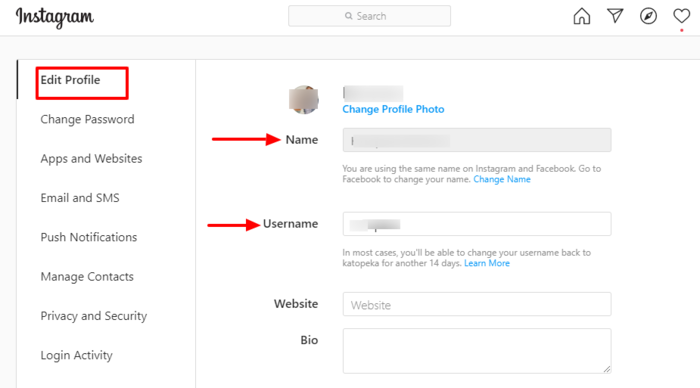
You can either change your Instagram name or your username.
- Instagram name: This is the name that will appear on your profile and under your posts.
- Username: Your username defines your account and is the one preceded by "@". It also determines your url.
You can easily change your Instagram name without affecting the backend of your account. However, changing your username has a big impact on what is going on in your backend. That brings us to the next point.
Your url will change and engagement may decrease
Your username is part of your Instagram URL. If you change it you will have to change your url.
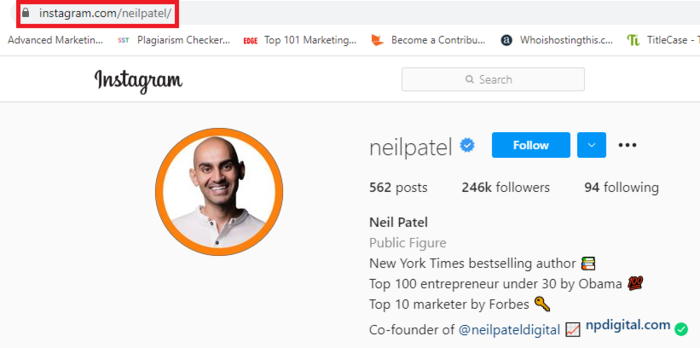
In this case, it may take a few weeks for search engines to index your new URL. As a result, the traffic and engagement you get from other places that you have linked your Instagram account to will be affected. This includes other posts that tagged your account.
3 quick tips to manage your Instagram account name change
Most people complain of loss of followers and engagement when they change their company name. Here are some tips to help you make the transitions go smoothly.
1. Notify your followers of the name change
Before changing your company name, make sure your followers know that you are rebranding. This will let your followers know that you are still active, even if they sometimes can't find your account when they search for it.
2. Change your grip on all other platforms
Changing your company name will affect all other social media platforms. So make sure you change all of the handles.
3. Edit links to your account
Remember that your username affects your URL. Once you change it, your old url will become unusable.
Because of this, you'll need to visit all of the blogs and other platforms that you've posted your URL on and edit them with the new URL. Sure, this can be a lot of work, but it needs to be done to reduce the negative impact of changing the name.
Changing your company name on Instagram can have a negative impact. Make sure you only do this when absolutely necessary.
Here's how to manage your Instagram accounts if your company has multiple accounts for different departments
If your company has multiple Instagram accounts for each department, juggling can be a pretty daunting task. In many cases, it is worth the hard work as multiple accounts will help you:
- Customize your messages for each of your audiences.
- Address audience preferences in different geographic locations.
One of the easiest ways to manage multiple accounts is to switch between accounts. To do this, you need to add the other accounts that you want to manage to your Instagram app. On mobile devices, you can do this by:
- Go to settings.
- In the Sign In section, click Add Account.
- Enter the credentials of the account you want to add and sign in.
You can then easily switch between accounts by clicking the profile icon.
Another way to manage multiple accounts is to set up sign-in for multiple accounts. In order to do this:
- Go to Settings.
- Select "Multi-Account Login".
- Select the account that you want to use to access the other accounts.
Anyone who has access to the account you used as an administrator account has access to all other accounts.
Once you've set up your accounts this way, it's easier to manage multiple accounts without logging in and out.
How do you manage multiple Instagram accounts on one desktop?
To manage multiple Instagram accounts on desktop, you need to use Facebook's free dashboard called Creator Studio.
Linking your Instagram accounts to Creator Studio is easy:
- Switch to a company profile.
- In Creator Studio, click the Instagram icon.
- Log into Instagram from Creator Studio.
With Creator Studio, you can publish and schedule content to multiple accounts. You also get access to Instagram Insights, Instagram's native analytics tool.
Use a social media management tool
Managing multiple Instagram accounts from the platform itself can be tedious and time consuming. An easier way is to use a third-party tool that allows you to manage all of your accounts from a single dashboard. Examples of such tools are:
- Hootsuite
- CoSchedule
- Sprout Social
- buffer
A social media management tool gives you a bird's eye view of what's happening across all of your accounts from a single dashboard. It also has the benefit of assigning tasks to team members, which makes collaboration a lot easier.
Managing multiple Instagram accounts for different departments seems like a daunting task. However, this becomes easy with Instagram's account switching feature or using a third-party tool.
Conclusion
Instagram is one of the best social media platforms for growing your business.
With over 1.2 billion active monthly users and the fourth most popular social networking site, you can't afford to ignore these. It is undoubtedly a network that you need to include in your social media marketing strategy.
Because of this, you need to be careful when merging Instagram accounts. Well done, the worst that can happen is losing a few followers. However, if you don't do it well, you may need to build your brand on Instagram from the ground up.
What is your experience with merging Instagram accounts?

See How my agency can drive Firmly Traffic volumes on your website
- SEO – Unlock tons of SEO traffic. See real results.
- Content Marketing – Our team creates epic content that is shared, links accessed and visitors drawn.
- Paid media – effective paid strategies with a clear ROI.
Book a call