
Methods to Create a Sponsored Snapchat Filter
Snapchat advertising has a lot going for it. With 249 million active users per day, you can showcase your brand to a large audience. The engagement on the platform is just as massive. Snapchatters open the app more than 30 times a day on average.
There are three types of Snapchat ads: snap ads, filters, and lenses. I've written before about the value any Snapchat ad can bring to your business. This post provides an excellent overview of the different advertising opportunities on Snapchat and whether it's worth the investment.
Today I will go into more detail about it. Below, I'll focus on Snapchat sponsored filters, how to create them, and why you should.
What are Sponsored Snapchat Filters?
Snapchat filters are overlay images that are used when taking selfies. They're one of the most popular features on the app and they've driven record growth. For example, the gender swap filter attracted 7 million new users days after it was released.
Businesses can pay to create their own Snapchat filters. Each filter is available in the app for a limited time. Filters can also be limited to a specific area that advertisers can set before launch. This is known as a geofilter.
Why Use Sponsored Snapchat Filters?
There are many reasons a company might want to pay for their own Snapchat filter.
First, they are a great way to increase brand awareness given the popularity they inspire. A 2019 study by Snapchat found that filters are one of the main reasons users spend time on the app.
They can be incredibly inexpensive. You can make your own Snapchat filter for just $ 5. So you don't have to be a big brand to take advantage of this.
Snapchat filters offer a lot less competition. While every company in the country has a Facebook presence, only a fraction of them create their own filters. They are a great way to differentiate your brand from the competition.
After all, Snapchat offers targeting that almost rivals Facebook. If you can limit your filters to a specific area, e.g. For example, near your stores, you can limit your advertising spend to people who are actually likely to buy.
How to Create a Sponsored Snapchat Filter
Creating a Snapchat filter is nowhere near as daunting as you think. I promise it.
Just follow my step-by-step guide below and you'll have your filter live in no time.
Download Snapchat
Go to Snapchat's Creative Tools page. Click on "Filters".
Note: You don't need a business account to create a filter for Snapchat. However, this is in your best interest. With a business account, you have more control and access to more advertising features.
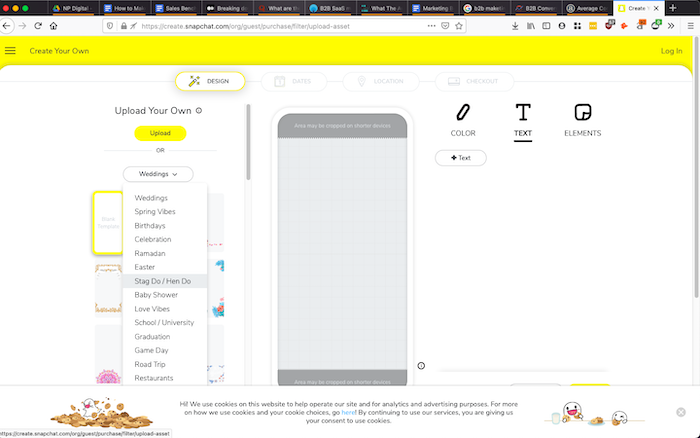
Use a template create A filter sponsored by Snapchat
Snapchat gives businesses all of the design help they need in the form of templates. Use the drop-down list to find a relevant topic, then choose the template that you like best.
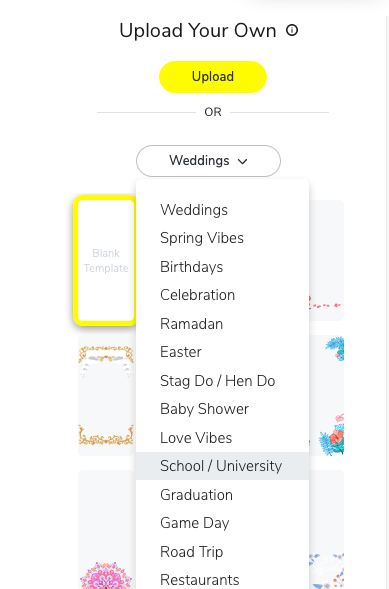
You should be able to find something that suits your tastes regardless of your industry or the type of filter you want to create.
Recreate your sponsored Snapchat filter from scratch
You can create your filter design from scratch if you don't like any of the templates. I recommend using a design tool like Canva, which has preset design dimensions for Snapchat.
Upload your own design by clicking the upload button at the top of the page.
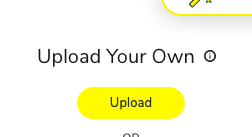
Your file size may initially be too large. If it does, use a tool like Compress PNG to shrink it.
Setting date and time
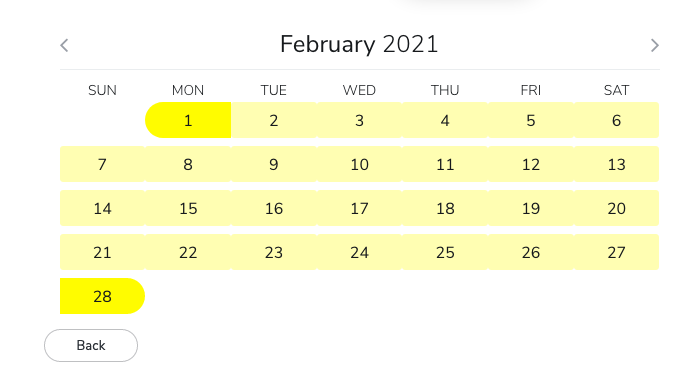
Next, you need to set the date you want your filter to be available and how long you want it to run. The longer your filter lasts, the more you have to pay.
Determine location
Next, you need to determine the location for your filter. You can search for a city or monument in the search box, or you can draw an area as shown below.
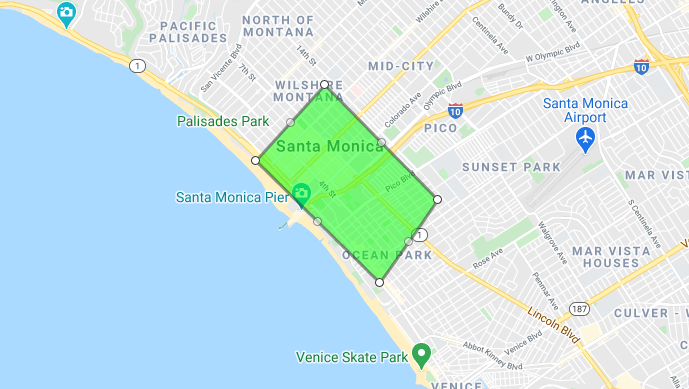
Note: The geofenced area must be less than 50 million square feet.
The larger the radius you choose, the more expensive your ad will be.
At this point, you will also see the price of your sponsored filter.

Now all you have to do is check out. It will take Snapchat a few days to manually approve your filter. Then you can get started.
4 Tips for Creating Great Snapchat Sponsored Filters
Don't create a Snapchat filter. If you want to make your filter as successful as possible, there are a few things to keep in mind.
Do you have a specific goal
No one will bother with a filter that looks like commercial spam. You need to have a valid reason for creating your filter and a measurable goal that you want to achieve. When you are clear about both of these factors, it will make designing your filter a lot easier, and ultimately your filter will be more successful in the long run.
For example, if you use your filter to promote a new product, you will find fun and creative ways to include the product. When promoting an event, make sure you have a thorough understanding of the geographic area and include the name of the event in your filter so that guests can indicate where they are.
Note the technical data
Snapchat has a number of specifications that your ad must meet in order to be approved. They include:
- The image must be 1080 x 2340 pixels
- The file size can be 300 KB or less
- The file must be in PNG format
- At least 50% of the image must be transparent
- There must be a 310px buffer zone at the top and bottom of the picture
- The placement of the logo must be clear and precise
Take the time to read these specifications carefully. There's no point in going to the trouble of designing a great ad to get disapproved for something avoidable.
There are also limitations brands should be aware of:
- No gambling or lottery pictures.
- No URLs, barcodes, usernames, CTAs, phone numbers, emails or logos from other social platforms allowed.
- No hashtags allowed.
- Filters should adhere to Snapchat's advertising guidelines.
KISS.
If there is one piece of advice you should take about anything it is: keep it simple, dumb.
The best Snapchat filters are the simplest. Don't take up a lot of space with pictures and don't plaster your brand all over the place. The cleaner your filter looks, the more people will want to use it.
Check out this example from Starbucks.
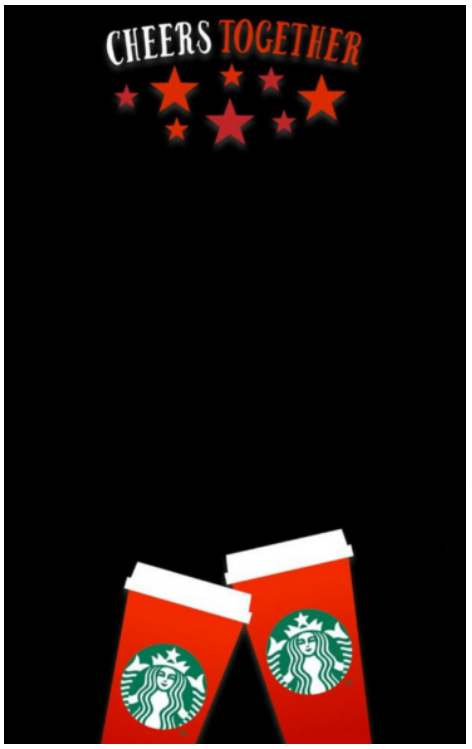
The design is so simple that I can only imagine. However, you can bet that thousands upon thousands of consumers took a selfie with it.
In other words, you don't have to be a design genius to run a sponsored Snapchat filter. Any business owner can do it.
Measure, optimize and improve
A sponsored Snapchat filter is no different from any other form of marketing. You need to measure and optimize your ad to get the most benefit. Fortunately, Snapchat makes this easy with its built-in analytics tool that gives you access to all of the metrics you need, such as: B. Impressions and engagement.
You can use this data to improve your next Sponsored Filter. For example, you may want to avoid regions with low exposure and invest more in regions with high exposure. You may also want to review other metrics such as in-store sales to see what impact your sponsored filters had.
Ways to Use Your Snapchat Sponsored Filter
Still unsure of how to use a Snapchat filter for your brand? Do not worry; There are many different tactics you can use and I'll cover some of my favorites.
Promote your brand partnership
If you're sponsoring an event like a charity run or festival, use a Snapchat filter to make sure your name shows up. Everyone likes to use social media to show what they're doing, so a filter gets loads of engagement. In addition, if you brand it carefully, you will get the recognition you deserve.
Draw customers into your brick and mortar store
You can use Snapchat's geofencing feature so your filter is only available to consumers who are close to your stores. A fun snapchat filter can be just the kind of nudge people need to eat at your restaurant or shop at your store.
It can also be a great way to use word-of-mouth marketing. Having consumers take a selfie with your filter after shopping at your store can encourage their friends to visit too.
If you have a lot of stores, setting up individual ads takes a lot of work. I recommend running a test program with a few stores to see if your filter is successful before expanding the campaign to the rest of your locations.
Introduce a new product
Snapchat filters are a great way to raise awareness of a new product launch. Including an image of the product in the filter helps consumers easily identify and get in touch with the product without having to purchase it.
The product doesn't even have to be physical. The Terminator Film franchise created its own filter to encourage the introduction of Terminator Genisys.
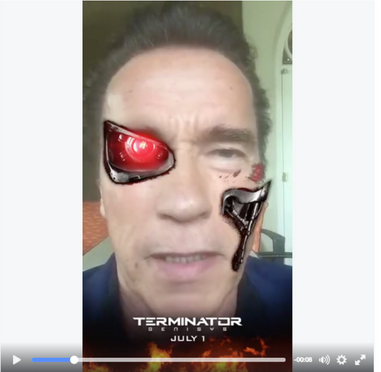
Are Sponsored Snapchat Filters Better Than Other Forms of Digital Advertising?
I highly recommend companies experiment with sponsored Snapchat filters. As I mentioned at the beginning of this article, they are very affordable and less competitive than Facebook Ads or Google PPC Ads. This makes them a great choice for small businesses.
Big brands can make big profits with Snapchat filters too, especially if you have a product that Snapchatters can interact with. McDonald & # 39; s, Starbucks, and Disney all had success with Snapchat filters.
Snapchat filters are especially relevant when targeting young consumers and women. Over 75 percent of 18 to 24 year olds use the app regularly. Almost two thirds of the app users are women.
If you're a B2B company or target older consumers, Snapchat is probably not for you. In that case, you'd better spend your advertising budget on Facebook or Google ads, or even invest in SEO.
Otherwise, give Snapchat a try and see if it works for you.
Conclusion
Snapchat may not be the dominant social media platform it once was, but it is still a valuable addition to your digital marketing strategy.
The site still has nearly 250 million daily active users and filters have a ridiculously high engagement rate. That means thousands of consumers can interact with your brand every day.
If your brand is B2C and particularly aimed at young consumers, creating a sponsored Snapchat filter could be a winning strategy.
What does your brand's Snapchat filter look like?

See How my agency can drive Firmly Traffic volumes on your website
- SEO – Unlock tons of SEO traffic. See real results.
- Content Marketing – Our team creates epic content that is shared, links accessed and visitors drawn.
- Paid media – effective paid strategies with a clear ROI.
Book a call