
When do you have to use HTTPs versus HTTP?
If you run a corporate website, you've probably heard the need to switch from HTTP to HTTPS. But is there a bigger difference than the extra "s"?
As a business owner, you know that even the slightest difference in a product, marketing strategy, or anything else related to your business can make a huge difference.
But will moving to HTTPS have a significant impact on your website and your business?
Eventually, some users won't notice the difference.
This explains the differences between HTTP and HTTPS and whether you should make the switch.
HTTPS vs. HTTP: What's the Difference?
Both HTTP and HTTPS are protocols that regulate how information is transmitted over the Internet. To understand the differences between HTTP and HTTPS, let's look at each one and how it works.
What is HTTP
HTTP is an acronym for Hypertext Transfer Protocol, an application layer protocol created by Tim Berners-Lee. The protocol provides standard communication rules between web servers and clients (browsers).
The biggest problem with HTTP is the use of hypertext structured text so that the data is not encrypted.
As a result, the data transferred between the two systems can be intercepted by cyber criminals.
For example, suppose you are visiting a website that uses HTTP and the website requires you to create credentials to log in. Because the data shared between the servers and your browser is not encrypted, it makes it easier for hackers to intercept and decrypt your credentials.
Because of this, search engines like Google are now showing an open lock icon for web addresses that use HTTP. They also display a message that the website you are trying to visit is not safe.
Another disadvantage of HTTP is that it can only process one request at a time.
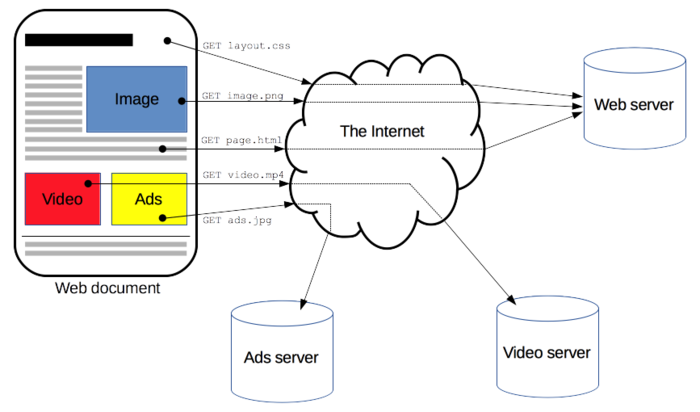
A complete document is reconstructed from various sub-documents. There are several requirements to load just one web page. This of course means that the loading speed for large websites and pages can be negatively affected.
What is HTTPS?
HTTPS is an enhanced version of HTTP that implements an SSL or TLS to encrypt the information transmitted between a server and a client.
SSL is an abbreviation for Secure Sockets Layer, while TLS stands for Transport Layer Security. Both technologies create a secure, encrypted connection between a web server and the web browser with which it communicates.
The additional level of security makes Hyper Text Transfer Protocol Secure (HTTPS) a better alternative between the two protocols. This is especially true for websites that process sensitive data, such as e-commerce websites or other websites that require users to sign in with their credentials.
In short, HTTPS is a more secure version of HTTP.
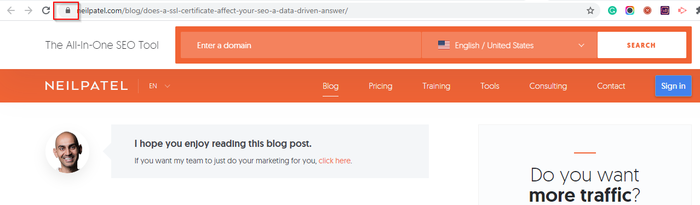
This security offered by HTTPS ensures that user information is secure on three levels:
- Encryption: This ensures that a user's activities cannot be tracked or their information can be stolen.
- Data Integrity: HTTPS prevents files from being corrupted when they are transferred between a web server and a website and vice versa.
- Authentication: HTTPS authenticates websites. Authentication increases user trust.
As you can see, the differences between HTTP and HTTPS are huge.
HTTPS vs. HTTP: Which is Better for SEO?
I'll answer this right away: HTTPS is better for SEO. Here's why.
HTTPS is better for site security
Security is one of the most important things search engines look for when ranking websites.
Because of this, Google announced that HTTPS is one of the ranking signals they use in their algorithm.
This is one of the main advantages of HTTPS over HTTP when it comes to SEO.
HTTPS referral data is clearer
In addition to the safety factor, another SEO benefit you get with HTTPS that you don't get with HTTP is better insight into recommendation data. If your website continues to run over HTTP and you review your data in Google Analytics (GA), the traffic going through referral sources may appear as "direct" traffic. HTTPS gives you a clearer picture of where your traffic is coming from. This will enable you to develop more effective SEO strategies.
Use HTTPS Builds Authority
Because browsers like Chrome inform users that a website they are visiting uses HTTP and is therefore not secure, many visitors leave the website immediately. This high bounce rate has a negative impact on your SEO as it is a signal of poor user experience (UX). UX is vital because, according to Google, the page experience is one of the most important ranking factors.
Conversely, when visitors visit a website using HTTPS, search engines are showing users that the website is safe to visit. These safety signals encourage consumers to interact more with this website.
The speed factor
Another important ranking factor for search engines is the loading speed for websites and pages. Speed is one area where HTTP really began to show its weaknesses. This is because HTTP only allows one pending request per TCP connection. As a result, the upload speed decreased as websites and pages became more resource intensive.
HTTPS, on the other hand, is faster than HTTP. The loading times are shorter, which means that search engines often rate websites that use HTTPS better than websites that are still using HTTP.
Which is better for SEO between HTTP and HTTPS? I'm sure that from the above points, you've seen that HTTPS wins hands down.
How does HTTP / 2 come into play?
Since its inception in the early 1990s, HTTP has seen few changes. The last major improvement took place in 1997 and was known as HTTP 1.1.
In the internet years that was an eternity ago.
Internet technology has advanced rapidly and old protocols will no longer make it. This is especially true in the age of dynamic content and resource-intensive multimedia pages.
Trends like these required that HTTP be desperately needed and overdue overhaul.
Enter HTTP / 2.
What is HTTP / 2?
HTTP / 2 is an improvement over HTTP because it uses multiplexing. Multiplexing simply means that the communication line is opened once and multiple files can be sent at the same time.
In the meantime, only one file can be sent over a TCP connection (line) using HTTP. This line must be closed after each file has been sent, resulting in slower speeds.
Another improvement on HTTP / 2 is that it uses binary protocols instead of the text protocols used by HTTP. Binary protocols use less bandwidth and are less prone to errors. They also handle elements like spaces, upper and lower case, and line endings much better.
Other important improvements are:
- Header Compression: Header compression reduces the overhead caused by the slow start mechanism of TCP.
- Server push: HTTP / 2 servers place resources that are likely to be requested in a browser's cache. As a result, browsers can display content without sending additional requests.
- Increased security: Like HTTPS, HTTP / 2 uses encryption to improve the security of users and applications.
The improvements to HTTP / 2 lead mainly to improved efficiency, security, and speed, making it a viable alternative protocol. Also, HTTP / 2 is more SEO friendly than its predecessor.
Why does this matter in the HTTPS versus HTTP debate?
HTTP / 2 is only available over an HTTPS connection.
If your system (or your client's system) does not support HTTP / 2, you can always implement it via a content delivery network (CDN).
Can you use both HTTP and HTTPS?
In practice, you can use both HTTP and HTTPS. You can load some resources over your secure HTTPS connection and others over your HTTP connection.
Using both protocols to deliver content is called "mixed content" because both HTTP and HTTPS content appear on the same page. Since the first request is transmitted over HTTPS, communication is secure.
However, loading some pages over HTTP weakens security and leaves you vulnerable to man-in-the-middle attacks. This happens when a malicious agent finds a vulnerability and exploits it to eavesdrop on your website or user data and ultimately use it.
Usually, browsers warn visitors who serve mixed content. In most cases, however, it will be too late. The unsafe inquiries would have already happened.
Hence, while you can use both HTTP and HTTPS together, most browsers start to block websites with mixed content. If Google is advocating a pure HTTPS internet, you'd better switch to HTTPS.
How to convert HTTP to HTTPS
Now that you understand the importance of switching to HTTPS, let's take a quick look at how to switch from HTTP to HTTPS. Even if you're not tech savvy, the process is pretty straightforward. The necessary steps that you need to follow are:
Step 1: prepare to convert
Converting HTTP to HTTPS is an important step. If your website is not very busy, prepare adequately for it by planning it out. Make sure everyone on your team knows what is happening as there can be downtime switching.
Step 2: Buy and Install an SSL Certificate
Once you are ready to convert, the next step is to purchase an SSL certificate. In most cases, you can purchase one from your website host. They can even install and configure it for you.
You need to find out the correct SSL certificate as they are not all created equal. They fall under three main types:
- Domain Validated (DV SSL)
- Organization validated (OV SSL)
- extended validation (EV SSL)
The encryption level for all three SSL types is the same. However, the biggest differences between them are the verification and verification processes to get the certificate.
DV SSLs are the easiest to get and are mostly used by small websites. OV-SSLs are next in the rigors of the verification process, and EV-SSLs are the toughest.
Once you've purchased your SSL Certificate, your web host should install and configure it for you. If not, you can easily generate keys from the seller and paste them into your website host's control panel. Usually you can still contact support and ask them to help you with the configuration.
Step 3: Enable HTTPS
The complexity of your migration depends largely on the size of your website. If your website is large, you can do this in phases, starting with specific subdomains with particularly important content.
Once HTTPS has been installed correctly and is working properly, you will be able to access the HTTPS version of your pages.
However, you still need to verify that your SSL certificate is installed correctly.
You also want to configure all of the internal links on your website and change them from HTTP to HTTPS.
Step 4: Setup 301 redirects from HTTP to HTTPS
If you're using a CMS, you can automatically redirect traffic from the servers to your new HTTPS protocol. If you're not using a CMS, you'll need to do manual 301 redirects.
301 redirects will notify search engines that your website has changed and they will need to index your website under the new protocols.
When you have successfully migrated your website from HTTP to HTTPS, you need to add the new website to Google Search Console and review it.
Conclusion
Hopefully this will settle the debate between HTTPS and HTTP.
If you run a business website, converting your website to HTTPS must be part of your overall digital marketing strategy.
Not only can an unsecured website cause a loss of traffic, but the lack of the trust factor can also cause your sales to suffer.
Go ahead and switch to HTTPS. The investment is worth it.
What results did you see with the conversion when you switched from HTTP to HTTPS?

See How my agency can drive Firmly Traffic volumes on your website
- SEO – Unlock tons of SEO traffic. See real results.
- Content Marketing – Our team creates epic content that is shared, links accessed and visitors drawn.
- Paid media – effective paid strategies with a clear ROI.
Book a call